
Unified Communications & Collaboration: A 2026 Guide

Your Monday already has a 9:15 call on the desk phone, a project thread in chat, a video review at 10, and a spreadsheet nobody can find. Each tool has its own login and its own contact list. By lunch, three people have asked the same question in three places, and the person who knows the answer is marked busy on one app and available on another.
That friction is not a minor annoyance. Unified communications & collaboration is the system your company uses to talk, decide, and record work. When it stutters, meetings start late, calls drop, and decisions vanish into a chat nobody can search later.
What Unified Communications & Collaboration Covers
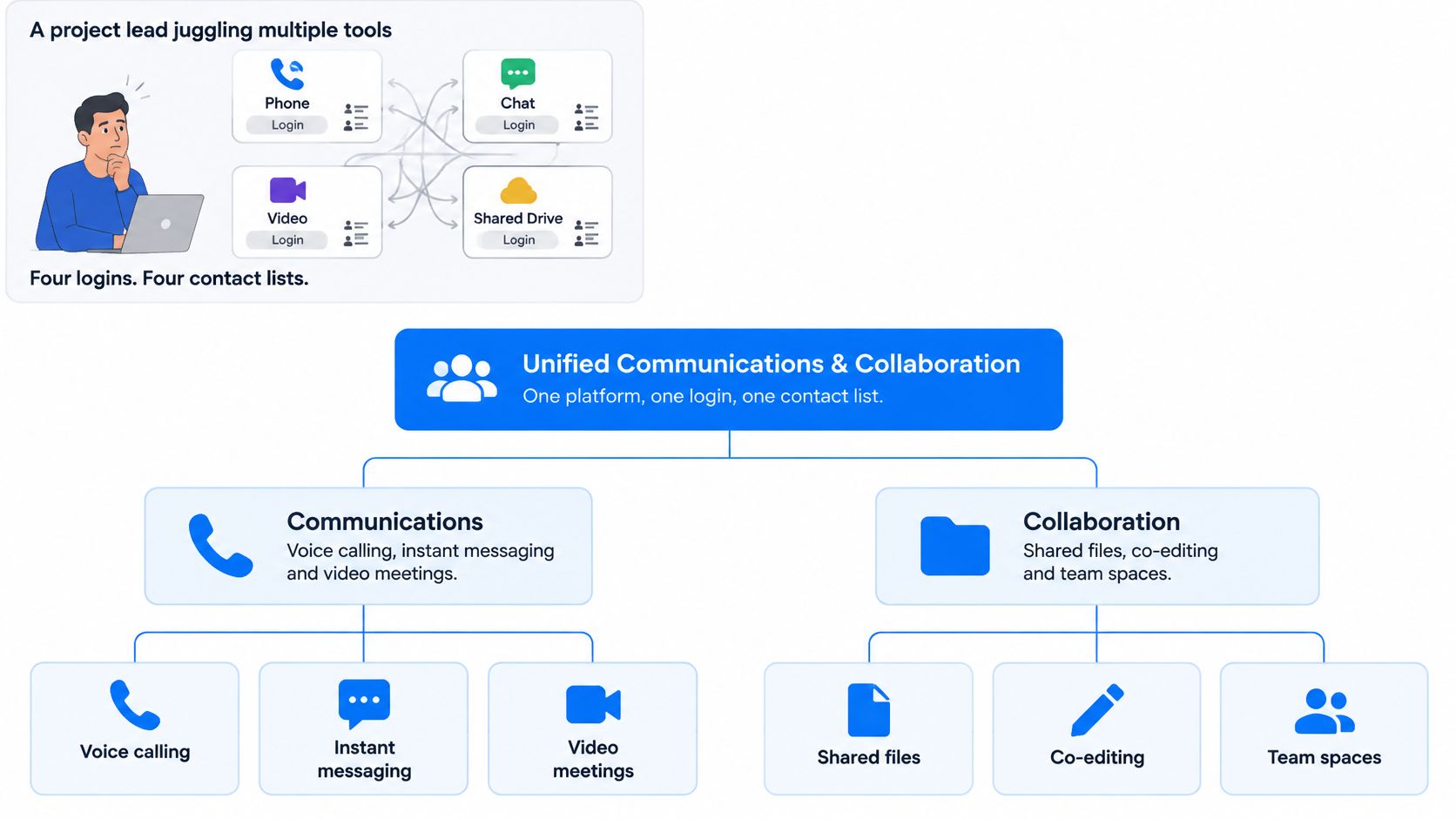
When a supplier calls during a project meeting, the team should be able to move the conversation from chat to voice or video without losing the context or searching for a new contact. That is the practical goal of unified communications and collaboration: keep the channels people use for work connected enough to support reliable, measurable, inclusive communication.
Unified communications & collaboration brings voice, video, messaging, meetings, presence, and file collaboration together on a platform with a shared identity. People can move between channels without starting over with a different account.
Voice, messaging, and video now commonly travel over IP networks, which can carry different kinds of communication through the same connection. Bringing these services into one platform can simplify how employees reach one another, though it does not guarantee reliable service or equal participation by itself.
| Component | What It Covers | Everyday Example |
|---|---|---|
| Voice | Business calling, extensions, voicemail, and call routing | Desk phone or softphone on the company number |
| Video | One-to-one calls and group video with screen sharing | Laptop camera or a room system in a conference room |
| Messaging | Persistent chat channels and direct messages with history | A project channel where decisions are logged |
| Meetings | Scheduled or ad hoc conferences with recording and join links | A calendar invite with a one-click join link |
| Presence | Live status showing availability and the device a person is using | A green status beside a colleague's name |
| File sharing and co-authoring | Shared documents edited together with version control | Two people editing one spreadsheet at the same time |
Presence is the connecting layer
Presence shows a colleague's availability across the tools your organization uses. For example, a calendar-based Do Not Disturb status can signal that a person is in a meeting, helping others choose whether to message or wait before calling. If status information is inaccurate or inconsistent across apps, employees have to guess, which can lead to interruptions or missed calls.
The categories are easy to list; the operating consequences matter more. Treat unified communications and collaboration as an operating model, not a phone-system swap.
On-Premises, UCaaS and Hybrid Models Compared
A collaboration platform is an operating dependency: if calling or meetings fail, work slows and support costs rise. Where the software runs determines who maintains it, how costs are divided, and how changes reach employees. The three models are choices about ownership and responsibility.
| Model | Who Runs the Infrastructure | Cost Pattern | Speed of Change | Best Fit | Main Drawback |
|---|---|---|---|---|---|
| On-premises | Your IT team in your own data center or server room | Large upfront hardware and licences plus support contracts | Slow, since upgrades are planned projects | Regulated sites needing full control over call data | Patching, refresh cycles, and staffing fall on you |
| UCaaS | The vendor, in its cloud | Per-user monthly subscription with predictable operating costs | Fast, since features arrive through vendor updates | Distributed teams and fast-growing firms | Depends on internet access and the vendor's roadmap |
| Hybrid | Core services or backup capacity on-site, with calling or meetings in the cloud | A mix of capital and subscription costs | Moderate, since two platforms must change together | Sites with legacy PBX equipment or local continuity needs | Two management systems that must be integrated and tested |
One manufacturer, three questions
A manufacturer with 400 seats across two plants keeps its legacy PBX on-site so plant-floor paging can continue if the wide-area network fails. Office staff use cloud calling to reach suppliers without relying on a server room. That is a deliberate hybrid design, with each system serving a defined need.
Three questions help settle the choice:
- Where must call control and media run? Regulation or site continuity may require local infrastructure. If a plant must place calls during an internet outage, cloud-only calling does not meet that requirement.
- How quickly do you need new features? UCaaS updates arrive on the vendor's schedule. On-premises upgrades depend on your team's testing and change windows.
- Can your team maintain the systems? If not, owning servers creates a staffing and support burden alongside the technology cost.
Remote participation is common, not the default
A National Bureau of Economic Research working paper reports that, in survey data collected in 2023 from workers in Australia, Canada, New Zealand, the United Kingdom, and the United States, respondents worked from home an average of 1.4 paid days per week. The paper also reports that 29% of meetings had all participants joining remotely. These figures describe a hybrid pattern, not a remote-first workplace. The platform needs to serve people in the office and people joining remotely in the same meeting. Read the NBER working paper.
The hybrid trap is two management systems, duplicate policies, and call-routing rules that nobody has tested end to end.
Rule of thumb: Distributed sites often start by evaluating UCaaS. Strict regulatory or uptime requirements may point to a hybrid model, with one named owner responsible for keeping the two systems working together.
Integration and Security Checkpoints Before You Buy
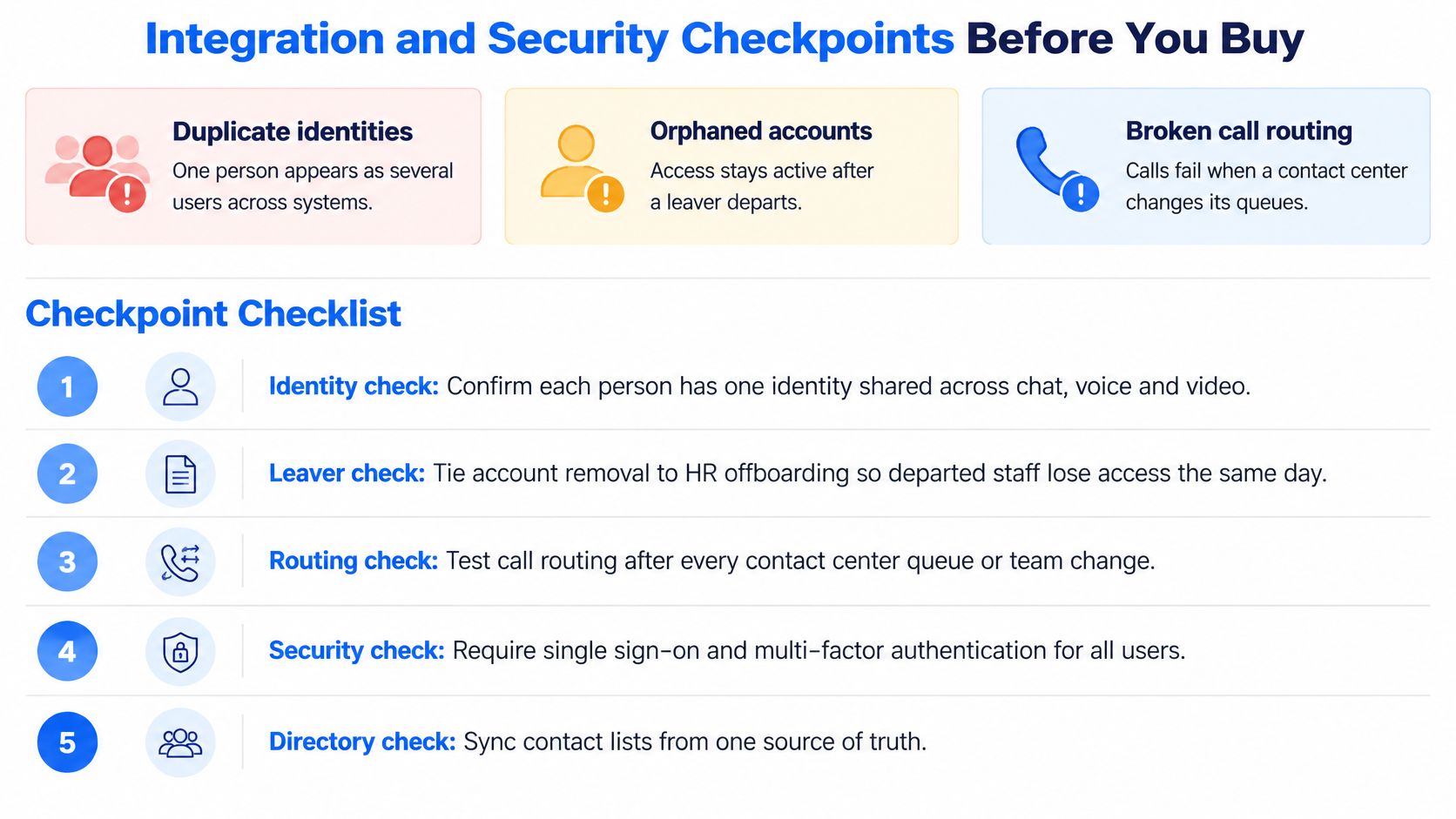
Integrations fail in boring ways. A person exists as three users because chat, voice, and the directory never agreed. A leaver's account stays live for weeks after HR processed the exit. Call routing breaks the morning a contact centre renames its queues. Feature lists don't catch any of that.
Eight checks before a shortlist
- Directory sync and single sign-on with multi-factor authentication. One leaver removal should shut off every channel the same day, not after a ticket sits in a queue.
- Number porting and SIP trunk capacity. Write a test-call plan for each site before you move a number. A port that looks fine on paper can still drop inbound sales calls.
- CRM, calendar, and ticketing connectors. Mark which are native and which need custom API work. Custom work is a project, not a checkbox.
- Encryption in transit and at rest. Ask for TLS on signalling, SRTP on media, and documented storage encryption. "We encrypt" is not a control.
- Admin role separation and audit logs. Export logs to your SIEM so a privileged change is visible outside the collaboration admin console.
- Recording consent, retention, and legal hold. Notices, retention periods, and a hold process belong in the contract, not in a later policy memo. Pair this with your IT security compliance obligations before recordings pile up.
- Emergency calling location data. Every desk and every remote worker needs a location record, including E911 in the US. A softphone on a home network does not inherit the office address.
- Vendor evidence and data residency. Request SOC 2 Type II or ISO/IEC 27001 reports, plus residency options for regulated data. Certifications that appear only after you sign are a warning.
The test that matters most is a failover drill. Disconnect the primary path and confirm calls and meetings still connect. If the vendor can't run that drill in a pilot, don't assume production will be kinder.
Measuring Collaboration Performance and Cost
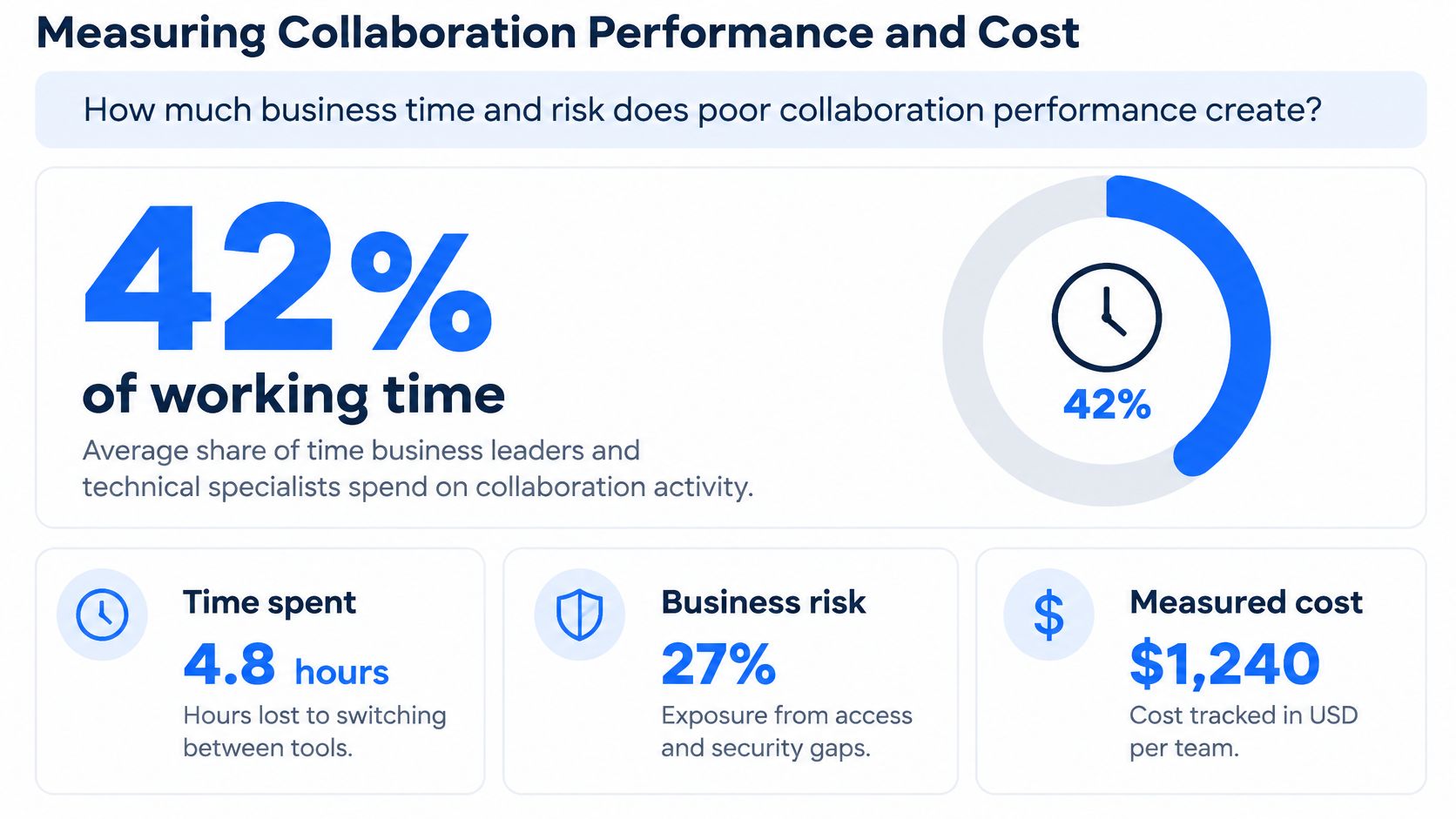
The executive question is simple. How much business time and risk does poor collaboration performance create? Business leaders and technical specialists spend an average of 42% of their work week in unified communications tools, yet only 46% are very satisfied, and satisfaction among technical specialists falls to 38%, according to Riverbed's global survey. That's a core operating dependency, not a phone bill.
Metrics worth collecting
| Metric | What It Measures | Benchmark |
|---|---|---|
| Voice quality (MOS) | Mean opinion score rated by users or estimated from network data | 4.0 or higher |
| One-way latency | Delay between one speaker and the other | Under 150 ms |
| Jitter | Variation in arrival time of audio or video packets | Under 30 ms |
| Packet loss | Share of audio or video packets that never arrive | Under 1% |
| Meeting join time | Seconds from clicking a join link to being in the meeting | Set from your pre-migration baseline |
| Incident resolution time | Time from ticket to fix, by severity tier | Set per severity tier in the SLA |
Take the baseline before migration, split by site and by device type. A headquarters wired desk and a home laptop on Wi-Fi are different networks. A single company-wide average hides the site that's already failing.
Turning friction into money
Use loaded hourly cost times hours lost to failed joins, repeated calls, and searching for files. In 2024, Zoom and Morning Consult estimated inefficient collaboration cost $16,491 per manager per year in wasted time, from a survey of nearly 8,000 leaders and employees across 16 countries, as reported in the global collaboration workplace findings.
Ten managers at that rate is $164,910 a year. Treat the figure as a prompt to check your own time logs, not as a universal constant. Technology expense management then has a number to argue with, instead of a feature comparison that never mentions downtime.
The platform with the longest feature list is not the winner if join time and call quality stay unpredictable across locations.
Making Hybrid Meetings Fair for Every Participant
A remote participant can see every slide and still miss the conversation. Room acoustics, camera placement, and turn-taking rules shape who gets heard, so meeting fairness depends on how people work together as well as on the platform.

Transcripts, captions, recordings, and AI summaries can make information easier to revisit. They cannot give someone a turn to speak. Automated tools also introduce privacy and retention questions, so decide who can access recordings and how long they remain available.
An operating model, not a licence feature
Set meeting norms and room practices that make participation visible:
- Remote-first norms. In-room colleagues join from their own devices when practical. This lets everyone see the same participant list and speaking queue.
- A rotating speaking order. Ask the facilitator to monitor raised hands on the call, not only voices around the table.
- Room layout. Place cameras at eye level and test microphone coverage across the table. A microphone that favors one seat can leave other participants hard to hear.
- Caption testing. Test captions with speakers who have varied accents, then review their accuracy before relying on them for accessibility.
- Consent and retention. Tell participants when recording starts and set a retention period. Keeping recordings indefinitely increases privacy risk without guaranteeing they will be useful.
What you measure afterward
Review participation by location and check whether decisions are recorded in a shared workspace within an agreed period. If in-room participants dominate discussion or remote speakers are repeatedly missed, investigate facilitation, room equipment, and meeting norms before treating the problem as a platform defect.
For regulated or legally sensitive meetings, turn off AI summaries or require human review. A recap that misstates a commitment can create more work and risk than no recap at all.
Choosing a Platform Against Your Business Criteria
A platform that works well at headquarters can still fail employees at home or leave IT with unclear responsibility when calls drop. Compare each option against how your organization operates, then make the trade-offs visible with a weighted scorecard. Microsoft Teams, Zoom, Cisco Webex, and other platforms differ in telephony, room hardware, and administration. The best fit depends on your sites, risks, and support capacity.
| Criterion | What to Verify | Red Flag |
|---|---|---|
| Deployment fit | Whether the model matches your sites, regulation, and IT capacity | The vendor pushes one model regardless of your sites |
| Integration depth | Native connectors for directory, CRM, calendar, and ticketing | Every integration needs custom development |
| Security and compliance | Encryption, logging, E911, and data residency | Certifications are available only on request |
| Performance across locations | Results at each site type, including home and small offices | Results come only from a high-bandwidth demo network |
| Devices and rooms | Certified room systems and compatibility with existing desk phones | Only proprietary hardware is supported |
| Total cost of ownership | Per-user fees plus integration, administration, and support over three years | The quote shows only list price |
| Support ownership | A named escalation path and an SLA covering faults across vendors | Carriers and software vendors have no shared owner |
Set the weights before vendor demonstrations. For example, assign security 30%, total cost of ownership 25%, support ownership 20%, performance 15%, and integration 10%. These sample weights prioritize risk and operating cost; adjust them to reflect your organization's needs, but keep the total at 100%.
Cost over time and who owns the fault
Calculate total cost of ownership over three years. Include user fees, integration work, administration, and support hours. A lower per-user price can cost more overall if it requires custom connectors or substantial staff time.
Use the same weights to score every platform. For instance, the 25% cost category should account for three-year expenses, while the 20% support category should reflect whether one named party owns incidents that cross carriers and software. A vendor's strong performance in one category should not outweigh the criteria your team agreed mattered most.
Demo conditions can hide weak performance. Test results from home broadband and small-office connections alongside headquarters results, then record each score and its evidence. IT procurement guidance can help teams define evaluation criteria and responsibilities before vendor demonstrations begin.
Confirm Your Shortlist With a Pilot Before You Sign
A contract should follow evidence from a pilot, not a polished demo. The sequence below reuses the baseline, the security checks, and the scoring weights you already set.
- Set the baseline at three sites: headquarters, a regional office, and a home-working group. Use the same metrics you chose for voice quality, join time, and incident handling.
- Pick 50 to 100 users who mix desk workers, remote staff, and at least one meeting room. A pilot of only power users will flatter the product.
- Run 30 days with scripted test calls, scheduled and ad hoc meetings, file co-authoring, and a failover drill. Scripted calls catch routing bugs that casual use misses.
- Score each vendor on the agreed criteria, with the weights IT, security, and the business owner set before the pilot started.
- Get security evidence and E911 setup in writing. Verbal assurances don't survive a staff change at the vendor.
- Negotiate an SLA with a named escalation path and a single owner for faults that cross carriers and software.
- Sign only if the pilot meets the thresholds from step 1. A vendor who misses the baseline in a controlled month will not beat it after go-live.
If internal capacity is thin, an independent brokerage such as MR2 Solutions can coordinate the pilot and the scoring across vendors, alongside the platforms you're testing, without replacing your own decision.
MR2 Solutions helps mid-market and enterprise teams evaluate, procure, and govern voice, video, and collaboration platforms through a vendor-neutral brokerage, including UCaaS and related networking choices. If you want a shortlist scored on reliability, cost, and hybrid-meeting inclusion rather than a feature checklist, start with MR2 Solutions. Bring your site list and your current pain points, and ask for a pilot plan before anyone asks you to sign.