
Cloud Repatriation: What It Is and When to Move Back

The most popular advice about cloud repatriation arrives in two flavours. One camp says owned hardware is cheaper for anything steady, so bring it all home. The other says public cloud wins on total cost once you count staff, so leave everything where it is. Both skip the number that decides the question for your estate, which is the break-even point of a single workload after egress, dual running and scarce skills are priced in.
That gap matters because the decision is no longer binary. Organizations move parts of their estate back and keep spending more elsewhere, which turns repatriation into a placement question rather than a referendum on cloud. Answering it well takes a repeatable method, and that's what follows: what the term means, which workloads survive the screen, what the cost model must include, what governance looks like afterwards, and how to confirm the answer with a pilot before anything production-grade moves.
What Cloud Repatriation Means and Why It Is Not an Exit
Cloud repatriation is the act of moving a workload, a dataset or a backup out of a public cloud and into infrastructure you control: dedicated hardware, a private cloud, or a colocation cage you rent by the rack. The definition is deliberately narrow, because that's where most confusion starts. A team that moves its production database onto owned servers hasn't exited the cloud any more than a shop that returns one shipment has closed its doors.
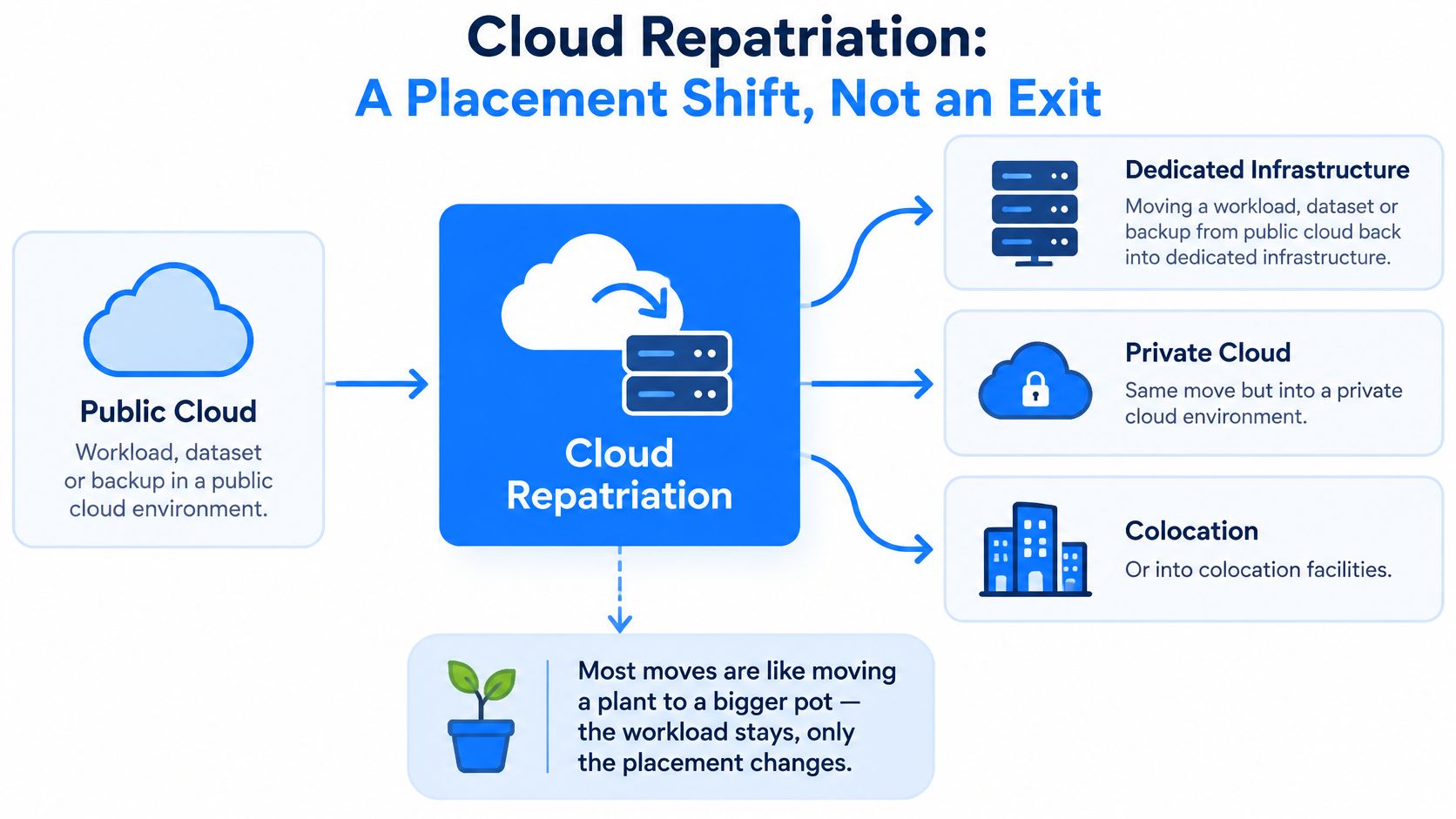
The scale of the trend is measurable, and so is its modesty. IDC's global server and storage workload surveys, run in September 2023 and March 2024, found that approximately 80% of respondents expected some level of compute or storage repatriation during the following 12 months. Fewer than 10% expected to repatriate entire workloads. That split is the whole story: the dominant model is selective rebalancing, not retreat.
Which workloads organizations reconsider first
The same surveys show a clear ordering. Respondents were more likely to reconsider AI lifecycle workloads, business applications such as CRM, ERP and supply-chain systems, infrastructure, and databases than engineering and technical workloads. The pattern makes sense once you look at how those systems consume resources. A database and its reporting traffic run hot and steady all year; a CI pipeline for a mobile app spikes when releases land and idles in between.
The term itself misleads people because it sounds like a migration story with a direction, when it's really a component story about location. Repatriation often describes moving production data, backups, or compute into dedicated infrastructure, a private cloud, or colocation while the rest of the estate stays put. Anyone who reads the trend as a one-way migration ends up arguing about strategy when they should be arguing about a spreadsheet row.
Placement is a continuous choice across public cloud, private infrastructure and colocation, reviewed one workload at a time and revisited each budget cycle.
For a CIO or IT director, that reframing is liberating. You don't need a position on whether cloud is good. You need a defensible answer for each candidate workload against cost, performance, security, compliance and operational requirements, and a note on when that answer should be re-tested. The organizations that get this right treat the boundary between environments as a managed asset rather than an outcome of whoever argued loudest in the last steering committee.
Why Organizations Pull Workloads Back
The reasons teams give for pulling workloads back are narrow and repeatable. Cost, security, performance and unmet expectations cover almost every case, and a February 2024 survey put numbers on how often each one appears. A OnePoll survey commissioned by Citrix questioned 350 U.S. business and IT leaders and found that 94% had been involved in a cloud-repatriation project during the preceding three years, according to Citrix's published findings.
42% said their organizations were considering or had already moved at least half of their cloud-based workloads back to on-premises infrastructure. The stated reasons were specific: unexpected security issues, cited by 41%, projects failing to meet high expectations at 29%, and failure to meet or establish expectations at 23%. Note that two of the three top reasons are about expectations rather than technology, which tells you more about how migrations were scoped than about what public cloud can do.
What the survey measures, and what it doesn't
It does not prove that 42% of U.S. enterprises completed large-scale exits. The sample measured leaders' views and included both completed and contemplated moves. The broader multinational study covered organizations with more than $500 million in revenue, and the cited 350-person subset represented the United States. So read the figures as evidence that repatriation became a mainstream governance issue by early 2024, not as a completion rate.
How each driver shows up in practice
- Cost surprises: a FinOps review finds the bill is dominated by network egress, cross-zone traffic and a managed-service premium nobody priced at design time, so the compute line everyone argued about turns out to be the small one.
- Security findings: an audit turns up unmanaged keys, over-broad service accounts and logging gaps in a shared-responsibility model where the team assumed the provider had it covered.
- Performance shortfalls: a site in a distant region reports response times the architecture was never going to deliver, and the fix is proximity rather than a bigger instance.
- Expectations never set: the project had no success metric beyond "migrate", so nobody could declare it finished, and the argument drifted into infrastructure ideology.
The discipline that pays: name the driver behind any proposed move, write the metric that proves it worked, and date the review. A move justified by "cost" without a unit-cost target is an opinion with a budget attached.
Which Workloads Move Back and How to Test the Fit
A workload is a repatriation candidate only if its operating pattern and full cost support the move. High, steady utilization can favor dedicated infrastructure, while demand that rises and falls sharply often benefits from cloud elasticity. Data movement matters too: frequent transfers can add cost and latency even when compute looks inexpensive. Use the table to shortlist candidates, not to make the final decision.
| Workload trait | Keep in public cloud | Consider moving back | Check before deciding |
|---|---|---|---|
| Utilization | Bursty, seasonal or short-lived demand | Sustained, predictable load most of the year | Compare unit cost over 12 to 36 months |
| Data egress | Low outbound data volume | High recurring egress or cross-zone traffic | Model transfer bills, not only compute |
| Latency and I/O | Tolerates variable response times | Latency-critical or consistent I/O needs | Benchmark p95 and p99 before and after a pilot |
| Managed-service dependence | Relies on cloud-native managed services | Standard software that runs on your own stack | Price the replacement and the skills to operate it |
| Experimentation | New products and rapid testing | Stable, mature systems | Keep experiment pipelines elastic |
| Compliance and jurisdiction | Data already meets rules in its cloud region | Rules require a specific jurisdiction or on-site control | Confirm the provider's control evidence |
| Staffing | Team has no capacity to run hardware | Team can operate infrastructure and refresh cycles | Include scarce skills and on-call coverage in the model |
Utilization and egress, the two traits teams misjudge
Cloud elasticity is like renting extra seats only when a room fills up. It helps when demand spikes, but a workload that runs steadily at high utilization may keep paying for flexibility it rarely uses. A seasonal workload has the opposite profile: dedicated capacity sized for its peak could sit idle for much of the year.
Steady demand may favor dedicated capacity. Seasonal demand often favors elasticity.
Data movement can change the result. A published analysis of when repatriation makes sense estimates that transferring 500 TB out of a public cloud can cost nearly $45,000 before destination infrastructure is included. The same analysis says monthly bills can exceed initial projections by 50% to 100% when transfer, microservice communication and related network charges are underestimated. A workload whose services constantly communicate across zones can accumulate costs like a fleet of couriers making repeated trips: each transfer may look small, but the total matters.
Combine traits before you shortlist
Traits interact, so one attractive metric is not enough. A stable ERP database with heavy reporting traffic, predictable year-round load and modest outbound data may be a candidate: compute and data can sit together, reducing network crossings for reporting queries. A seasonal retail front end is a different case. Its demand spikes, releases arrive frequently, and elastic capacity may be worth the premium.
The harder case combines high utilization with heavy dependence on managed services. A pipeline using managed queues, managed search and serverless functions needs a priced replacement plan, including the people required to operate it. Stable databases, data-intensive pipelines and latency-critical systems may merit testing. Bursty, seasonal, experimental or highly managed-service-dependent workloads usually have a weaker case unless a workable alternative is in place.
Benchmarks to run before a pilot
Record the current environment before changing it: p95 and p99 latency, throughput, IOPS, CPU and memory utilization, failure recovery time, and peak-to-average demand. Measure the same metrics during a controlled pilot. Peak-to-average demand helps show whether dedicated capacity would be busy enough to justify its fixed cost.
Compare quotes, contract terms and refresh cycles over the same period. For example, on-prem versus hosted procurement tools can help organize that comparison. Avoid setting a multi-year hardware cost against only one month of cloud charges.
The resulting shortlist should separate candidates to test, such as a stable database, data-heavy pipeline or latency-sensitive system, from workloads that may fit cloud better, such as a seasonal storefront or experimental product. For each candidate, calculate a break-even point that includes data transfer, any period of dual running, replacement services and the skills needed to operate the destination. Only then does a pilot test whether the expected fit holds in practice.
The Cost Math Behind Moving Workloads Back
Build the comparison line by line, because most repatriation business cases fail on what they left out rather than what they counted. The table names each cost line on both sides and the item teams most often forget.
| Cost line | Public cloud | Private or colocation | Often missed |
|---|---|---|---|
| Compute | Hourly, elastic billing | Hardware amortized over a refresh cycle | Idle reserved capacity you still pay for |
| Storage | Per GB-month, tiered storage classes | Capacity purchase plus backup and replication hardware | Retrieval, snapshot and backup charges |
| Network egress | Per GB leaving the cloud | Fixed transit or colocation bandwidth contracts | Cross-zone traffic and service-to-service calls |
| Power and facility | Included in the service price | Power, cooling and rack space under colocation terms | Capacity headroom for growth |
| Staffing and FinOps | Cloud engineering and cost management | Infrastructure operations and maintenance | Scarce skills and on-call coverage |
| Migration and dual running | Usually low, but refactoring may apply | Data transfer, cutover, and two environments running in parallel | Decommissioning and exit costs |
| Software licensing | Often bundled or marketplace pricing | Licenses you must hold per core or per instance | License mobility rules |
The mechanism behind the savings case is utilization. Public cloud prices include an elasticity premium, so a steady-state workload can repeatedly pay for capacity that stays unused, while owned infrastructure spreads fixed costs across resources you consume. That's the whole engine. Nothing about owned hardware is cheaper by default; it's cheaper when the utilization curve is flat.

Case evidence shows the magnitude, and the enterprise repatriation analysis behind these figures is careful about what they mean. 37signals reported approximately 60% lower monthly cloud spending after moving compute and storage to owned infrastructure. GEICO reported roughly 50% lower compute cost per core and more than 60% lower storage cost per gigabyte after shifting workloads to private infrastructure. Those are organization-specific outcomes, not benchmarks you can apply to your own estate.
The two errors that make repatriation look cheaper than it is
The first is comparing a steady-state run rate against a cloud bill that includes development, testing and three experiments nobody killed. The second is stopping the model at month one. A practical comparison starts with a 12 to 36 month public cloud baseline that includes compute, storage, network egress, cross-zone traffic, managed-service premiums, software licensing, support and FinOps labor, then sets private or colocation costs against it: hardware amortization, power, facility capacity, staffing, maintenance, backup and refresh cycles.
Then add what decides the answer. Migration, dual running, refactoring, data transfer and decommissioning belong in the model, because apparent run-rate savings evaporate when two environments run in parallel for four or five months. A saving that looks like 40% annually can shrink to a rounding error in year one once cutover labor and parallel operation are counted. If part of the estate needs refactoring before it can move, a Software Modernization Intelligence cloud analysis will tell you what that refactor costs while you can still say no.
Finally, run a sensitivity pass on utilization. Move the assumed utilization from 70% to 45% and watch the payback period change. Pair the model with technology expense management so the baseline reflects what you pay rather than list prices. The output you need is a break-even figure per workload: the utilization and egress level below which staying put wins.
Governance and Control Requirements After a Move
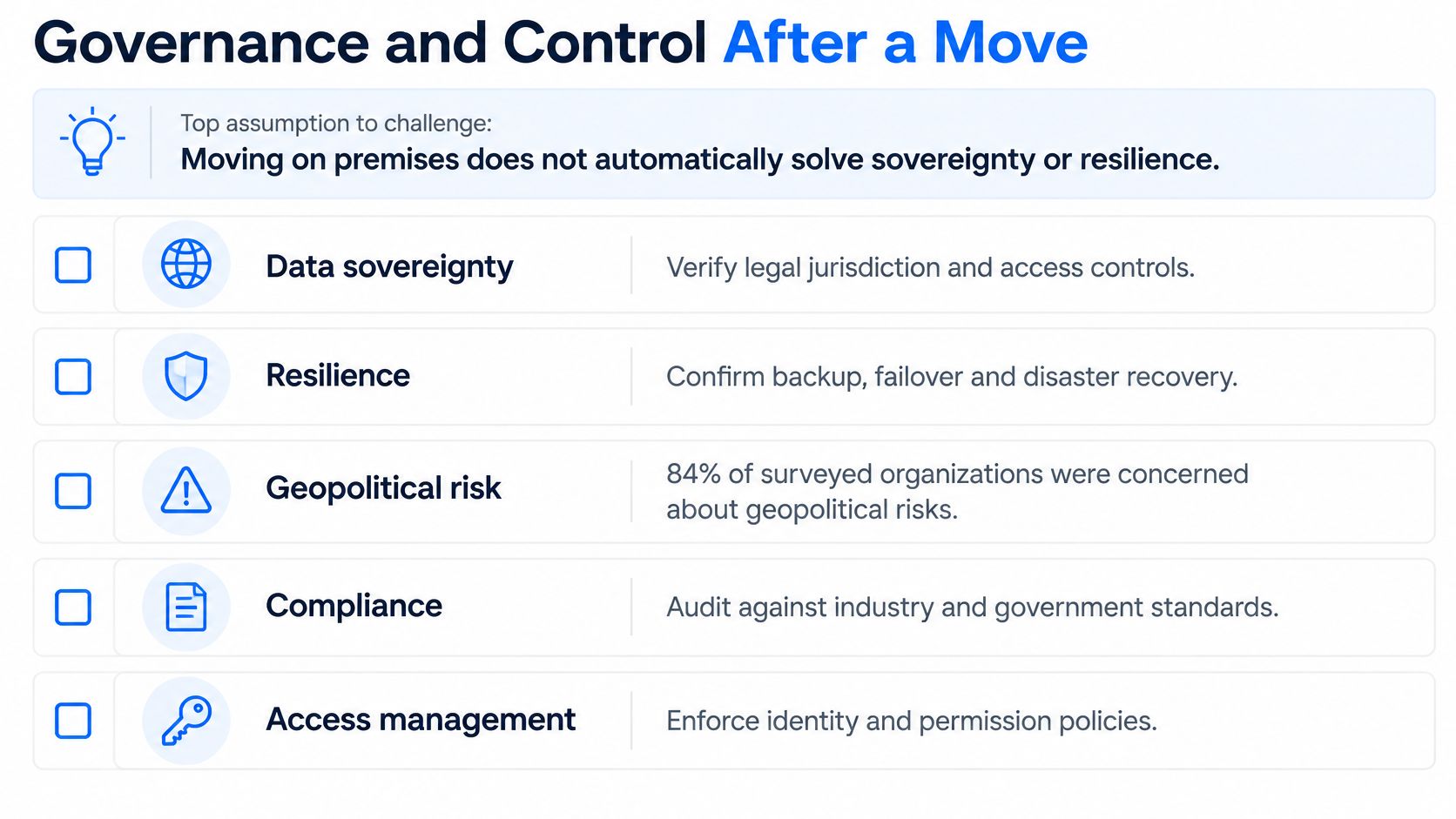
Moving a workload onto infrastructure you operate changes who is responsible for it. It does not automatically settle where the data falls under law, how recovery works, or who can access the systems. Those questions need separate controls.
Computer Weekly's reporting on resilience, risk and repatriation cites findings that 84% of surveyed organizations were concerned that geopolitical developments could threaten their ability to access or control data, and Forrester survey data indicating that 32.62% of public-cloud applications were being repatriated, mainly as specific workloads rather than entire environments. Public-sector organizations also often favour a mix of public and private cloud. Hybrid by design can mean moving selected workloads while keeping others in public cloud.
Five questions to answer separately
Jurisdiction, operational control, disaster recovery, staffing and provider concentration are different risks. A move can improve one while worsening another, so assign a test and an owner to each.
| Question | What it tests | What to confirm before cutover |
|---|---|---|
| Jurisdiction | Where data lives and which law applies | Named-country colocation or sovereign platform terms |
| Operational control | Who patches, configures and audits the stack | Runbooks and admin access logs owned by your team |
| DR independence | Whether recovery runs without the primary site | Second facility or provider in a separate failure domain |
| Staffing resilience | Coverage if key engineers leave | Cross-trained on-call rota and documented procedures |
| Provider concentration | Dependence on one colocation, hardware or identity vendor | Second source for each critical layer |
A privately operated environment may improve jurisdictional control and cost predictability, yet concentrate risk in one colocation provider, hardware supply chain, identity system or understaffed operations team. Server lead times and firmware dependencies become operational responsibilities when you own the infrastructure.
Data movement also creates follow-on work. Egress costs, integration redesign and backup changes can accompany new duties for encryption, access logging, incident response and geographic redundancy. Backup deserves its own cutover test: a cloud-native backup service may not follow the workload, so teams need to establish and test a restore path on the new platform.
Confirm before cutover: jurisdiction terms in writing, a named owner for admin access logs, a restore test run from the new platform, an on-call rota with two people per discipline, and a documented second source for hardware, transit and identity.
Migration Patterns from Hybrid to Full Repatriation
Very few organizations pick one pattern and stay there. They choose a shape for the first wave, learn from it, then adjust the boundary. What differs is what moves, how much reversibility you keep, and how much of your operating model changes with it.
| Pattern | What moves | Typical fit | Reversibility |
|---|---|---|---|
| Selective rebalancing | Specific workloads such as stable databases or pipelines | Most mid-market and enterprise estates | High, if data and integrations stay portable |
| Hybrid split by tier | Data and core systems on premises or in colocation, front end in cloud | Latency-sensitive transactional systems | Medium, depends on network design |
| Colocation move | Owned hardware moved into a colocation facility | Organizations wanting facility control without running a data center | Medium, depends on contract terms |
| Sovereign or private cloud | Workloads moved to a jurisdiction-bound or private platform | Regulated and public-sector estates | Lower, due to platform lock-in |
| Full exit | Entire estate leaves public cloud | Rare; small estates with stable profiles | Lowest, the hardest to reverse |
Why selective rebalancing dominates
The evidence points one way. Flexera's 2025 State of the Cloud survey found that respondents had repatriated about 21% of workloads and data, while their overall cloud footprint still increased. Both things happened at once, which is only contradictory if you think in exits.
Headlines misread the intent data in the same way. In 2024, 86% of CIOs in the Q4 Barclays CIO Survey reportedly planned to move at least some workloads back from public cloud, according to RSA's summary of the survey. "At least some" is the operative phrase, and it describes a rebalancing program, not a shutdown.
The hybrid split deserves a concrete picture, because it's where most of the value sits. Keep the transactional database and its data close to the users it serves, keep the front end and the burst capacity in the cloud, and specify the network path between them explicitly: which traffic crosses, at what volume, with what latency budget, and who pays for the transfer. If that design stays vague, you've built the cost problem you were trying to solve. Deciding where each workload belongs is easier when that boundary is drawn before procurement rather than during cutover. Managing both sides as one estate, with one identity model and one monitoring view, is the day-two job described in this guide to hybrid cloud management.
A full exit is the least reversible option and suits a small estate with stable, well-understood profiles. For everyone else, sequencing beats scope. Move one workload class at a time. Keep the rollback path open until the new platform has been through at least two full billing cycles. Retire the cloud copy only after the new platform has run through a peak period, whether that's quarter-end close, a seasonal sale or a regulatory filing deadline.
For the first wave, pick the candidate with the cleanest utilization history and the lowest egress, and let it prove the operating model rather than the biggest saving. Then set the cadence: re-run the placement screen every budget cycle. Utilization and egress profiles drift as products mature, and the boundary that was right last year is a guess this year.
Confirm the Break-Even Point With a Pilot Before Moving
Five steps, in this order, take a shortlisted workload from candidate to committed decision. Skipping the last one is how organizations end up defending a migration they can't measure.
- Inventory twelve months of data. Pull utilization, egress and I/O history for each candidate, not a representative week. Seasonality hides in the months nobody screenshots.
- Build the per-workload cost model. Public cloud baseline over 12 to 36 months, migration, dual running, decommissioning, then a sensitivity run at lower utilization. One number per workload, not a portfolio average.
- Pilot one stable workload under controlled conditions. Record p95 and p99 latency, throughput and recovery time before and after cutover, and run the pilot through a real peak if one exists. Our Cloud Assessment right-sizes and optimizes cloud spend, which makes it a sensible starting point for the baseline in step two.
- Clear the governance list. Jurisdiction, provider concentration, backup, access logging, encryption and incident response. Confirm each item in writing, with a named owner.
- Write the threshold down before the pilot starts. Express it as a break-even figure for that workload and agree in advance what a partial result means. Go, no-go, or split is a decision you make while you're still neutral.
The reason to fix the threshold first is simple: everybody involved becomes invested in the migration once the hardware quote lands. A threshold agreed beforehand is the only thing that keeps a failed pilot from becoming a rollout with a sunk-cost argument attached.
Once the pilot passes, plan the first wave using the pattern that fits, and hold the rollback path for two full billing cycles. Teams with no capacity to run hardware should price scarce skills before the pilot rather than after, because a security engineer who can operate a private platform costs more than the server it runs on. Our cloud and platform experts work across Microsoft Azure, Amazon Web Services and Google Cloud Platform, which helps when the answer turns out to be a split rather than a move.
The decision to make this quarter isn't whether to repatriate. It's whether to commission a break-even analysis for the top three candidates on your shortlist, starting with the workload that has the cleanest utilization history and the lowest egress. That one is cheap to model and fast to pilot, and it tells you whether the rest of the list is worth the effort.
MR2 Solutions helps CIOs turn this analysis into a decision with a defined number attached, from data center and colocation advisory through migration planning and coordination, backed by our Cloud Assessment for right-sizing spend before anything moves. We bring vendor-neutral brokerage and a curated provider ecosystem to the comparison, so the choice between colocation, private cloud and staying hosted is argued on unit cost and control rather than on whoever sold hardest. Visit MR2 Solutions to start with the workload that has the cleanest numbers.