
Unified Communications Technologies Guide for IT Leaders

A project manager starts the morning in chat, moves to a video meeting, calls a customer from a desk phone, and then tries to continue the conversation from a mobile device while traveling. The tools work individually, but the handoffs don't. Presence information is missing, call history sits somewhere else, meeting recordings follow a different retention policy, and the network treats a voice packet like any other application packet.
That experience explains why unified communications technologies matter. Unified communications, or UC, brings voice, video, messaging, presence, mobility, and collaboration workflows into a connected operating model. It isn't a newer telephone system, and choosing UCaaS doesn't automatically mean moving every communication function to one public cloud.
Core idea: Treat UC as an architecture made of connected services, protocols, networks, identities, and policies. The right design may be cloud-based, local, or hybrid.
The market's scale reflects that broader role. An independent estimate values the global unified communications market at USD 146.2 billion in 2024 and projects USD 530.5 billion by 2033, with a 14.63% compound annual growth rate during 2025–2033, according to IMARC's unified communications market analysis. A separate estimate places the market at USD 76.9 billion in 2025 and projects USD 142.8 billion by 2035, reinforcing the category's continuing expansion through a different methodology and market definition.
This guide builds from the basic UC stack to SIP, WebRTC, codecs, network quality, security, integration, and deployment choices. By the end, IT leaders should have a clearer way to decide what belongs on local infrastructure, what fits a hosted platform, and where governance must be designed before procurement.
Introduction to Unified Communications in the Modern Workplace
A distributed team rarely communicates through one channel. A colleague may send a chat message, escalate to a voice call, add a customer to a video meeting, and finish the discussion with a shared document. Each transition creates an opportunity for context to disappear.
Traditional telephony can still handle dependable calling. A meeting platform can still deliver video. A messaging application can still support quick questions. The operational problem appears when these systems don't share identity, presence, call history, routing logic, recording controls, or administrative policy.
Unified communications technologies connect those experiences. A user can see whether a colleague is available, choose an appropriate channel, and move from chat to voice or video without rebuilding the conversation in another tool. For customer-facing teams, the same architecture can connect business numbers, contact center queues, CRM records, recordings, and escalation workflows.
The underlying idea has developed over several technology cycles. Internet-based voice replaced some dependence on circuit-switched telephony, software platforms brought calling and collaboration together, and cloud delivery made hosted UCaaS practical for organizations that don't want to operate every communications server themselves. Remote and hybrid work accelerated demand for integrated calling, meetings, and messaging, a pattern described in the unified communications market report from Research and Markets.
Why the phone upgrade analogy fails
A phone upgrade focuses on endpoints and features. A UC decision includes identity, signaling, media transport, network paths, PSTN access, applications, security controls, support responsibilities, and user behavior.
That broader scope creates better options, but it also creates harder questions:
- Should the organization retain local call control for a regulated workflow?
- Should media stay near a campus or move through a provider's cloud?
- How will mobile users authenticate and receive calls?
- Where will recordings live, and who can retrieve them?
- What happens when a browser, firewall, codec, or WAN link behaves differently than expected?
The strongest UC design answers those questions before a vendor comparison becomes a feature checklist. It connects technical decisions to business outcomes, service quality, compliance needs, and the operating capacity of the IT team.
How Unified Communications Technologies Fit Together
Start with a conversation between two users. Before anyone hears audio, the system must determine who is calling, which device should ring, what capabilities each endpoint supports, and how the session will be established. That control exchange is signaling.
Once the call begins, the participants need a path for the actual audio and video. That stream is media. Separating these functions makes UC easier to understand because the system uses one set of mechanisms to arrange a session and another to carry its content.
Layer one is session control
SIP, or the Session Initiation Protocol, acts like a postal service for a call. It helps identify the sender and recipient, negotiate the session, indicate whether a device is ringing, and end the exchange. SIP doesn't represent the spoken words themselves. It manages the conversation around the conversation.
The analogy has limits, but it prevents a common mistake. SIP isn't the same as voice, and a SIP trunk isn't the same as an entire UC platform. A trunk provides a connection between an organization and a telephone network or service provider, while other components handle endpoints, routing, media, identity, and features.
Layer two carries real-time media
RTP commonly carries audio and video after signaling has established the session. The media is encoded with a codec, packetized, transported, decoded, and played by the receiving device. Network conditions affect the experience even when signaling works perfectly.
A user can therefore experience a call that connects successfully but sounds delayed, distorted, or uneven. The signaling layer did its job. The media path did not meet the application's requirements.
Layer three adds context and workflow
Presence tells a user whether a colleague is available, busy, away, or already in another session. Messaging provides asynchronous and real-time text interaction. Video conferencing adds multiparty media, while mobile applications extend the same identity and policy model beyond the office.
Cloud platforms package these capabilities as a managed service. A useful unified communications platform guide can help readers distinguish the platform experience from the protocols underneath it.
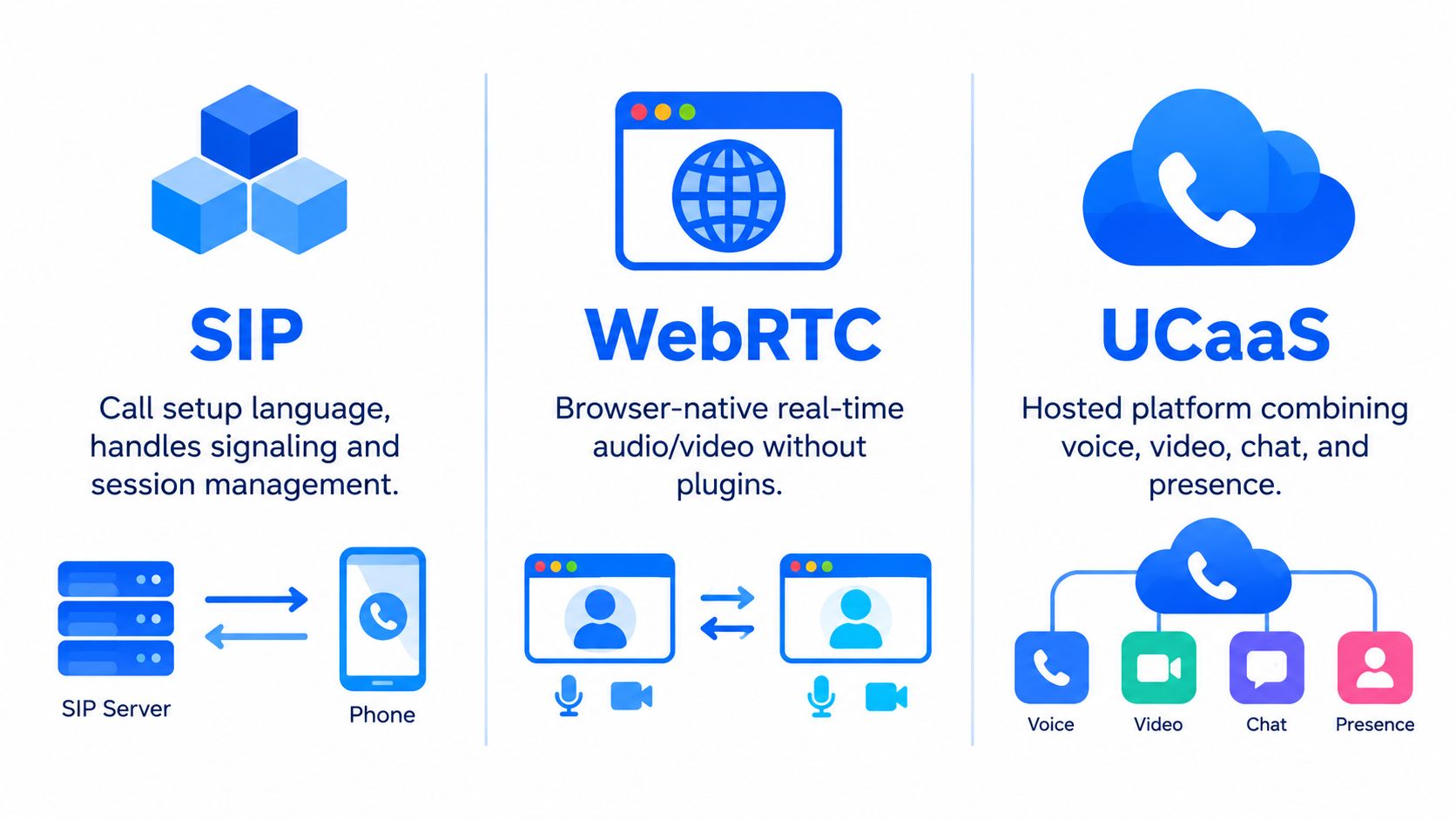
UCaaS is therefore a delivery and operating model, not a replacement for every protocol. A provider may use SIP for telephony, browser technologies for meetings, secure media protocols for encryption, and APIs for business applications. A hybrid organization may operate some of those components locally while consuming others from a provider.
The mental model is simple: signaling arranges the session, media carries it, presence and messaging add context, and applications turn communication into a business workflow.
Core Building Blocks Including SIP WebRTC and UCaaS
SIP, WebRTC, and UCaaS often appear together, but they answer different questions.
SIP answers how a communication session is initiated and managed. It supports call setup, routing, registration, feature negotiation, and termination. Enterprises commonly use SIP trunks to connect internal systems to external telephone services, while SIP endpoints and application servers support desk phones, softphones, contact centers, and automated workflows.
WebRTC answers how a browser can participate in real-time communication. It lets a user join audio or video from a supported browser without installing a traditional plugin. WebRTC deployments commonly use ICE for connectivity checks and DTLS-SRTP for secure media negotiation, which is especially useful for customer portals, browser-based contact centers, and lightweight meeting access.
UCaaS answers how the service is delivered. A UCaaS provider hosts and operates a platform that can combine business calling, meetings, messaging, presence, administration, and collaboration. The customer still needs to evaluate identity, PSTN arrangements, network paths, data controls, integrations, and support boundaries.
Compare the roles before comparing vendors
| Technology | Primary Role | Signaling and Media Security | Best Fit Use Case |
|---|---|---|---|
| SIP | Call setup, routing, and session management | SIP signaling can use TLS, while RTP media can use SRTP | PSTN connectivity, SIP trunking, telephony integration |
| WebRTC | Browser-native real-time audio and video | DTLS-SRTP with ICE-based connectivity checks | Browser-based meetings, portals, and contact center access |
| UCaaS | Hosted platform combining communication services | Provider-managed controls, with customer responsibility for identity and policy | Integrated calling, meetings, chat, presence, and mobility |
The security distinction matters. Cisco's deployment guidance describes TLS for SIP signaling and SRTP for the actual RTP audio stream. In plain language, TLS protects the instructions that establish the call, while SRTP protects the media moving during the call.
Codec selection adds another decision layer. G.711 is familiar in telephony and delivers high-quality audio with a comparatively straightforward bandwidth profile. Opus is designed for flexible real-time media and can adapt across web and conferencing conditions. Neither is universally superior. The right choice depends on endpoint support, network capacity, quality requirements, and interoperability.
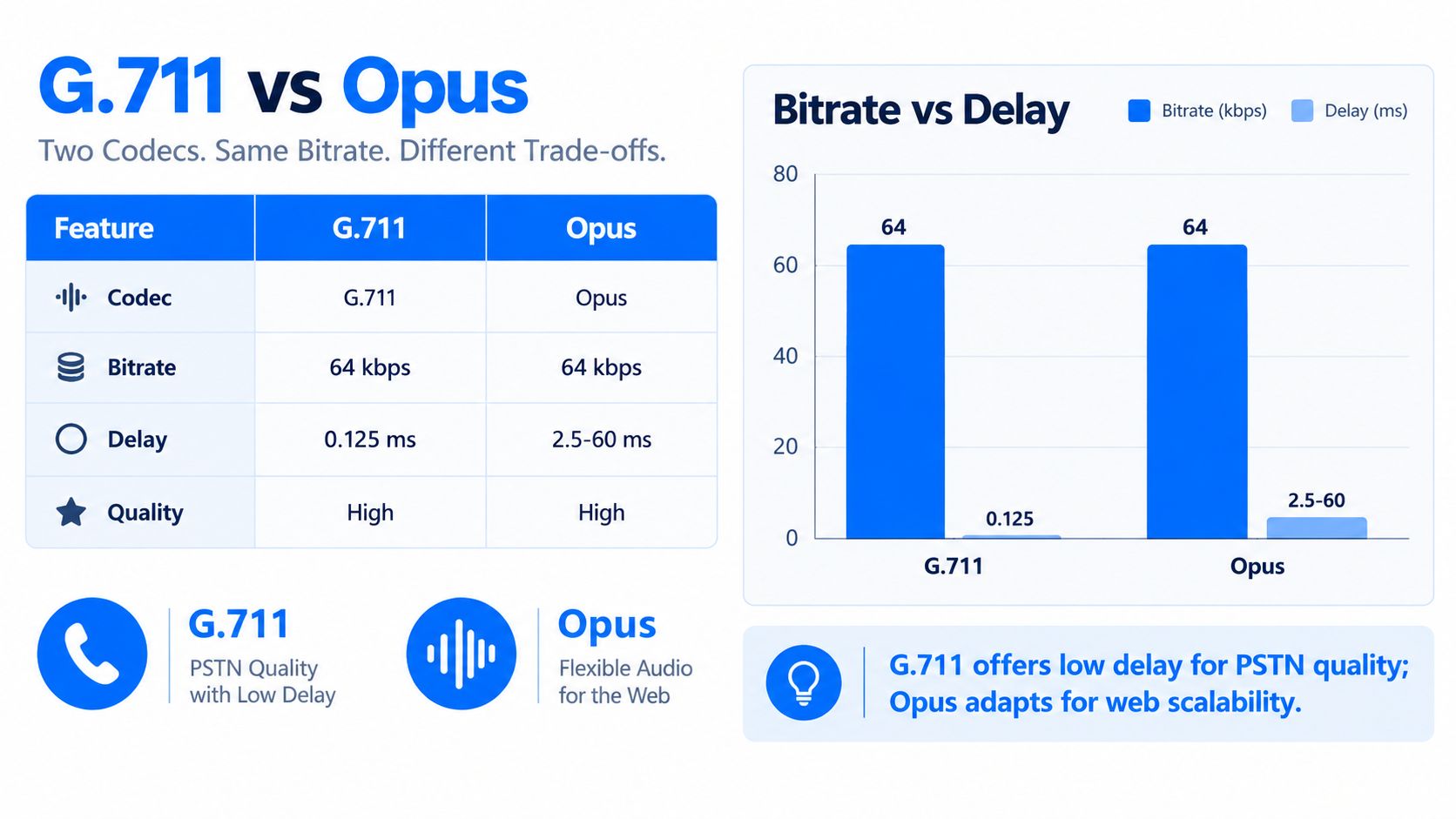
A browser meeting, a PSTN call, and a contact center interaction may all use the same UC experience while relying on different media and signaling paths. Architects should map those paths explicitly instead of assuming that one product label describes the entire technical system.
Codecs Quality and Network Foundations That Shape Experience
Users don't experience a codec chart. They experience a conversation with clipped syllables, awkward pauses, frozen video, or clean natural speech. Quality is an engineering outcome created by codec behavior, packet handling, routing, wireless conditions, and capacity planning.
Latency is the time required for media to travel between participants. For real-time UC, one-way latency above 150 milliseconds typically becomes noticeable, according to Cisco's bandwidth, latency, and QoS guidance. Jitter describes variation in packet arrival time. Above 30 milliseconds, it can also become noticeable to users.
Those thresholds aren't a promise that every call below them will sound perfect. They give architects practical design boundaries. A network can meet a nominal bandwidth target and still produce poor calls if queues introduce variable delay, wireless access points drop packets, or traffic takes an inefficient path.
Codec efficiency creates tradeoffs
Cisco's guidance shows how recommended bandwidth varies by codec and packetization. A G.711 call at 10 millisecond packetization may require about 220.8 Kbps, while a G.729 call at 60 millisecond packetization may require about 31.4 Kbps. Those figures illustrate a tradeoff between bandwidth efficiency and packetization delay, rather than a universal recommendation for every deployment.
Packetization determines how much audio a sender places into each packet. Larger intervals can improve efficiency by reducing packet overhead, but they can also add delay and make loss more disruptive. Smaller intervals may reduce packetization delay while increasing overhead.
Build QoS around the real traffic path
Quality of service should follow the complete path, not just the office LAN. Map the user's device, wireless network, access circuit, SD-WAN fabric, internet breakout, provider edge, and media service. A managed SD-WAN services approach can help organizations apply path selection and traffic policies across distributed sites, but it doesn't remove the need to test the actual UC flows.
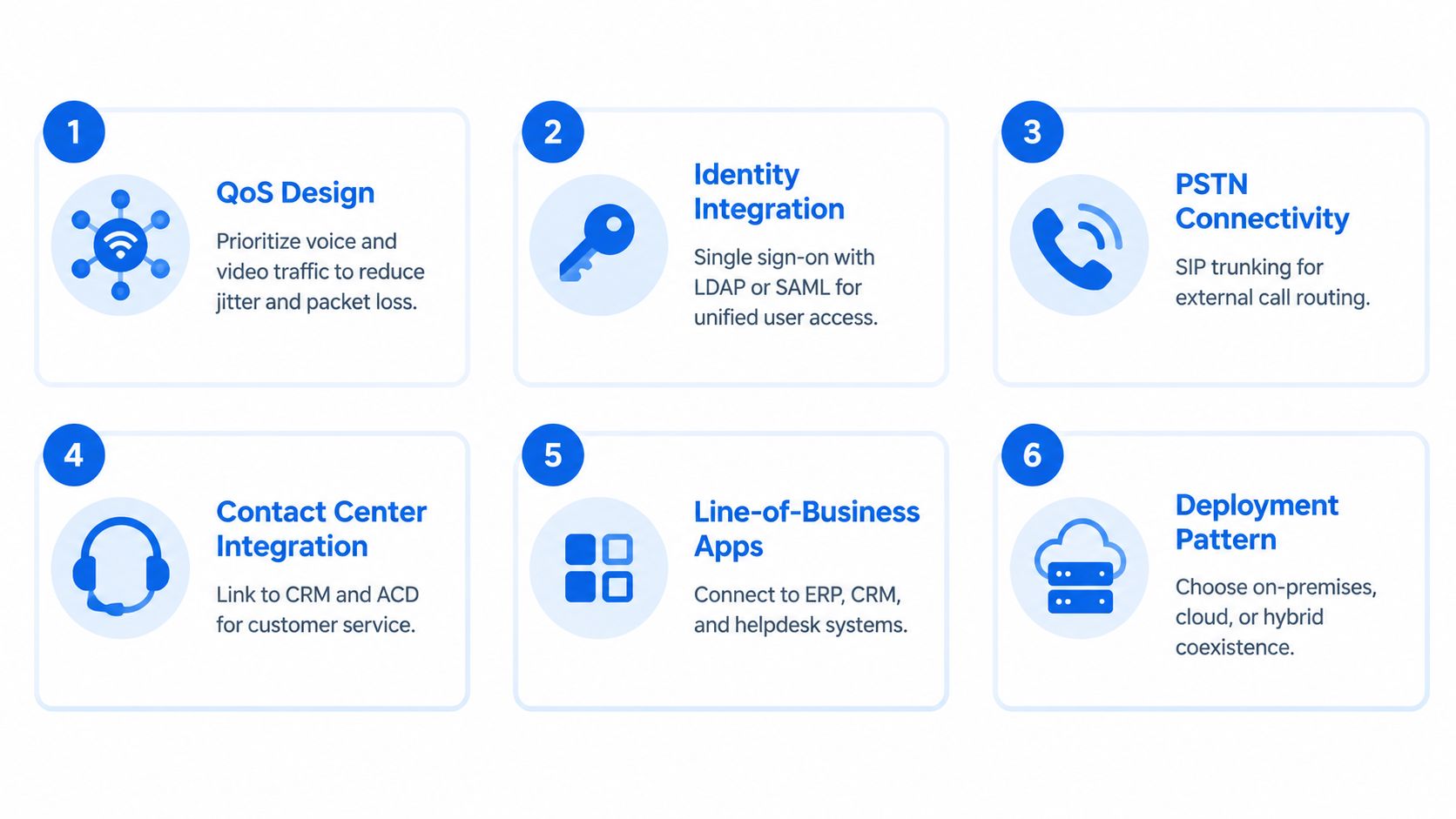
Prioritize voice and interactive video where appropriate, monitor loss and jitter, and validate behavior during congestion. Test mobile and home users separately because their media paths may bypass enterprise controls.
A sound capacity plan also distinguishes concurrent sessions from registered devices. A large device population doesn't automatically create large media demand, while a smaller contact center can generate sustained call volume. Measure both the expected session pattern and the network conditions that affect it.
Integration Considerations and Deployment Patterns in Practice
UC becomes valuable when it fits the systems people already use. A call that reaches an employee but doesn't open the customer record may still force manual work. A meeting that records without a defined retention policy may create governance problems. A mobile client that uses a separate identity store may create support and access-control gaps.
Start with the integration points that control user experience and risk:
- Directory and SSO: Connect user identity to the organization's directory and authentication policies. LDAP or SAML may support unified access, while multifactor authentication and lifecycle automation reduce orphaned accounts.
- PSTN and emergency calling: Document number ownership, porting requirements, outbound routing, emergency location handling, survivability, and failover before selecting a calling model.
- Contact center systems: Connect voice and digital interactions to the CRM, automatic call distribution, workforce workflows, recordings, and escalation paths.
- Business applications: Evaluate APIs and event handling for CRM, ERP, helpdesk, scheduling, and workflow tools. A third-party integration guide from Recepta.ai offers useful background for thinking about these connections as operating workflows rather than isolated features.
- Recording and retention: Define which calls and meetings are recorded, where the data is stored, how long it remains available, and who can export or review it.
Three deployment patterns
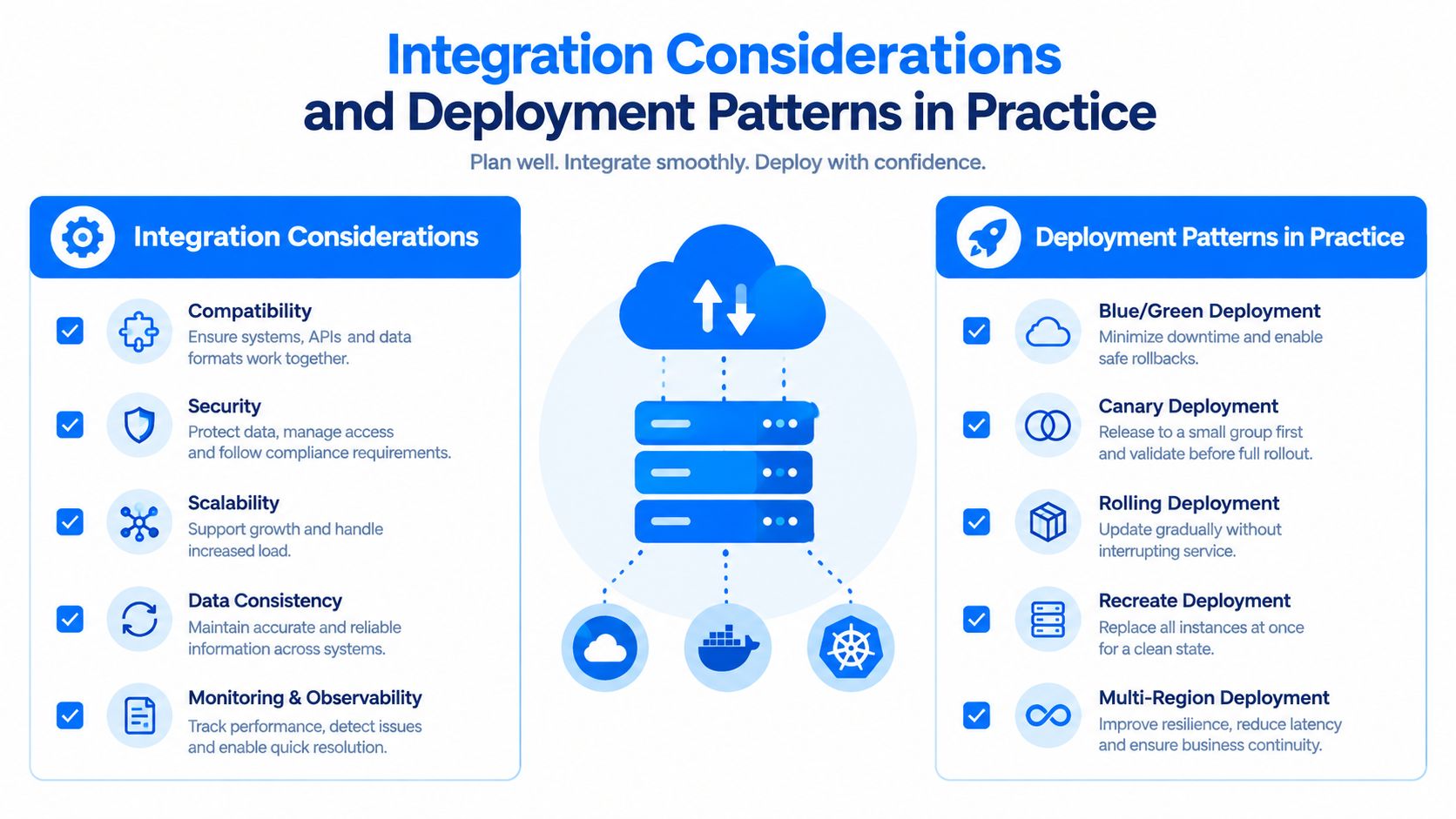
On-premises UC keeps call control, media services, and much of the operational responsibility within the organization. This can suit environments that require local control, specialized integrations, existing hardware investments, or predictable internal media paths. The tradeoff is ongoing responsibility for upgrades, resilience, capacity, certificates, security hardening, and specialist skills.
Cloud UCaaS shifts much of the platform operation to a provider. It can simplify geographic expansion, mobile access, software maintenance, and service scaling. The organization still owns decisions about identity, user lifecycle, network access, data governance, PSTN arrangements, and business continuity.
Hybrid coexistence separates the decision by function or user group. An organization might retain local call control for a plant, retain a specialized contact center integration, or keep a local survivability path while moving meetings and messaging to a cloud service. Hybrid designs can avoid forced rip-and-replace, but they require careful dial-plan planning, directory synchronization, routing, monitoring, and support ownership.
A broader multi-cloud strategy can provide a useful planning lens when UC services must coexist with other cloud platforms, regional requirements, or specialized workloads. The objective isn't to maximize the number of clouds. It's to place each dependency where its control, performance, compliance, and integration requirements make sense.
Security Governance and Common Misconceptions to Avoid
UC procurement often begins with calling costs, meeting features, and user licenses. Those matter, but collaboration tools now create a significant security and governance surface across identity, chat, meetings, recordings, files, external sharing, and contact center workflows.
Industry coverage reports that attacks on collaboration applications and platforms have more than tripled since 2021 to almost 30% in 2025, as described by TechTarget's collaboration security and governance coverage. The same source reports that 61% of security leaders expect a breach tied to a collaboration tool, while 79% say these tools create new threats. These figures point to a practical concern: adding communication channels without adding policy controls can expand the organization's exposure.
Misconception one is that cloud means secure by default
A cloud provider may operate strong infrastructure controls, but the customer still configures users, guests, devices, retention, recording access, federation, and administrative roles. A stolen credential, excessive privilege, or unmanaged external share can undermine a technically well-protected service.
For document-heavy collaboration, teams can also review controls for audit trails and access visibility through resources such as secure document tracking and analytics. The same governance discipline should apply to UC recordings, transcripts, chat history, and shared meeting content.
Misconception two is that encryption solves governance
TLS and SRTP protect communication in transit, but governance asks different questions. Can an administrator prove who accessed a recording? Can the organization place a legal hold on relevant content? Can a departing employee lose access promptly? Does an external participant receive more access than intended?
Use a control matrix during evaluation:
| Governance area | Questions for the evaluation |
|---|---|
| Identity | How are users provisioned, authenticated, and deprovisioned? |
| External access | Can guests, federated users, and anonymous participants be governed separately? |
| Data retention | Can policies differ for chat, recordings, transcripts, and files? |
| Administration | Are privileged roles separated and auditable? |
| Incident response | Can security teams search events, preserve evidence, and revoke access quickly? |
Regulated organizations should document the relationship between platform controls and internal obligations rather than assuming a product label establishes compliance. A healthcare provider's HIPAA compliance and cloud migration example can help frame that discussion around architecture and governance, not marketing assurances.
Choosing and Governing Unified Communications Technologies with Confidence
A good UC decision starts with the communication problems the organization needs to solve. Seat price comes later. First, identify the user groups, calling dependencies, customer workflows, mobility requirements, regulatory constraints, and network realities that shape the architecture.
Use four decision lenses:
- Architecture flexibility: Decide which services should remain local, which can move to UCaaS, and where hybrid coexistence reduces disruption or dependency risk.
- Experience quality: Validate latency, jitter, packet loss, wireless behavior, codec support, failover, and mobile performance under realistic conditions.
- Integration depth: Test identity, PSTN, CRM, contact center, recording, retention, APIs, and line-of-business workflows with representative users.
- Governance maturity: Review encryption, administrative roles, external sharing, audit records, data residency, retention, incident response, and vendor responsibilities.
The market is not necessarily moving toward one uniform cloud stack. Recent analyst coverage emphasizes flexibility, hybrid architectures, mobility, AI-enabled convergence, UCaaS and CCaaS combinations, CPaaS customization, and AI assistants. It also reports that more than 90% of organizations have implemented UCaaS, while spending is expected to remain flat for many organizations in 2026, and over one-third are willing to pay more for advanced features, according to Frost & Sullivan's enterprise telephony analysis. The implication is that buyers are refining value and architecture, not adding another subscription.
Run a vendor-neutral proof of concept with real call flows, real identity policies, real network paths, and real governance scenarios. Measure whether users can complete essential tasks, whether administrators can enforce policy, and whether operations teams can troubleshoot failures without relying on guesswork.
UC will keep evolving toward more connected, mobile, and AI-assisted collaboration. IT leaders who treat it as a governed architecture will have more room to adopt those capabilities without sacrificing control.
MR2 Solutions helps organizations evaluate, procure, implement, and govern unified communications, UCaaS, networking, cybersecurity, and related IT services through a vendor-neutral technology brokerage model. Visit MR2 Solutions to discuss your current communication architecture, integration requirements, and next deployment decision.