
Managed Services Colocation Explained for Modern IT Teams

Your team's racks are full, the cloud bill keeps landing higher than expected, and one senior engineer is already covering too many roles. That's the moment many CIOs realize the question isn't where the servers sit, it's who is operating them day to day. Managed services colocation turns that question into a practical decision about control, cost, resilience, and how much infrastructure work you want to keep inside your own team.
The category is growing because buyers want more than just floor space. A major market estimate puts the global data center colocation market at USD 84.05 billion in 2024, rising to USD 104.27 billion in 2025 and projected to reach USD 204.41 billion by 2030, with 14.4% CAGR over 2025 to 2030, while managed colocation is identified as the fastest-growing service direction at 20.2% CAGR in that same source (MarketsandMarkets). In plain terms, enterprises are buying operational relief, not just rack space.
Introduction to Managed Services Colocation Today
A lot of IT leaders start in the same place. They've got aging on-premises equipment, a cloud footprint that's harder to forecast than anyone expected, and a staffing model that looks fine on paper until an incident lands at 2 a.m. In that moment, the question is not which facility to choose. It is whether the team should keep owning power, cooling, patching, monitoring, and recovery workflows, or hand some of that work to a provider.
That is why managed services colocation has moved from a niche option to a mainstream hybrid IT strategy. MarketsandMarkets attributes this growth to enterprises outsourcing operations, remote monitoring, security management, and SLA-based support rather than leasing simple cabinet space. Buyers are looking for a place where owned hardware can run under a managed operating model.
The shift has a history. Telehouse America launched in 1987 and introduced managed services offerings in 2009, which marked the move from pure colocation to a bundled model with operational support (Data Center Knowledge). By 2017, a Vertiv survey found that 65% of respondents said their organizations were already using colocation data centers or planned to use them, showing how colocation had become a base for hybrid IT and managed operations (Data Center Knowledge).
For teams deciding what stays in-house and what gets handed off, that history matters. Managed colocation is not about renting racks and walking away. It is about choosing an operating model that can reduce noise for your staff, keep control over critical systems, and fit the kind of cloud repatriation or hybrid design you want. If you are also mapping broader modernization efforts, digital transformation tips from devPulse is a useful companion read because it frames technology choices around operating model, not just tools.
How Colocation and Managed Services Work Together
In plain colocation, the provider supplies space, power, cooling, and connectivity. You keep the servers, storage, and network gear. That split matters because it separates the building function from the operating model, which is often the decision point for cloud repatriation and hybrid IT.
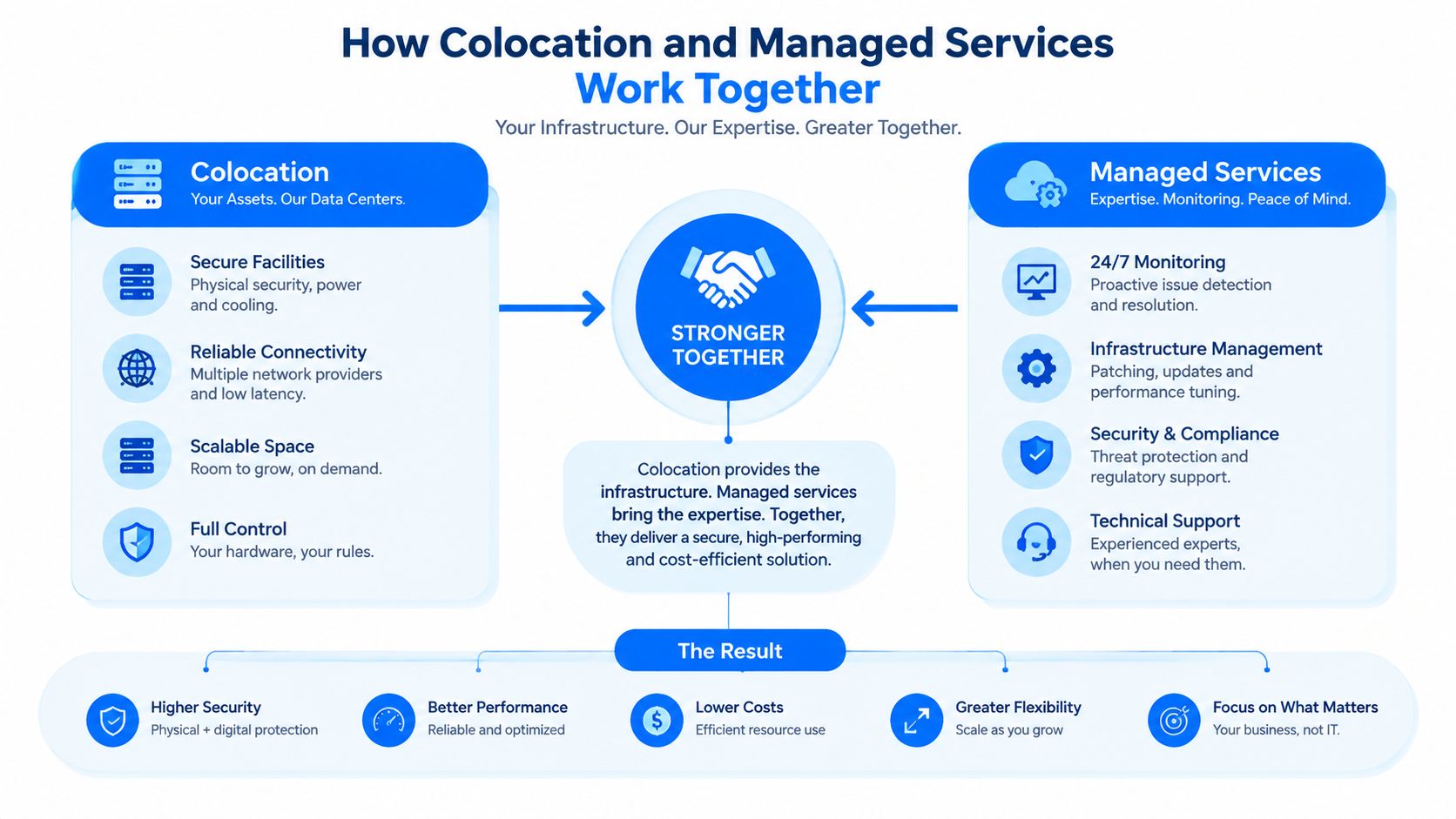
The facility side is only half the picture. Managed services add the work that keeps the environment healthy after the hardware is installed. That can include monitoring, patching, maintenance, backup workflows, and incident response. Flexential's colocation overview describes the core facility split, and that foundation supports many hybrid deployments (Flexential).
The practical difference shows up in ownership. In managed colocation, your team can keep architecture choices, data control, and hardware standards in house while handing off repetitive operational tasks. In managed hosting, the provider owns the equipment and manages a broader share of the stack. That distinction matters if compliance rules, application tuning, or a standard server build need to stay under your control.
Confusion usually starts when colocation, managed hosting, and cloud-managed services are treated as the same thing. Colocation is about the facility. Managed hosting shifts the hardware to the provider. Cloud-managed services abstract even more of the stack, which trades physical control for more flexibility. If you are deciding which duties should stay internal, managed IT services guidance helps define the operating boundary before contracts are signed.
A simple rule helps. If your team still needs to decide on the physical server and where it sits, colocation belongs in the discussion. If your team still owns the hardware lifecycle, you are not in managed hosting.
The value of the model is operational, not architectural. A CIO running a 40-rack virtualization stack can keep data ownership and platform decisions in house while handing off patching and 2 a.m. incident response to the provider. That is why the model often fits organizations that want less internal complexity without giving up control, and why digital transformation tips from devPulse can be useful when the choice is really about operating model.
Who Does What in a Managed Colocation Model
A managed colocation decision starts with a simple question: which work belongs inside your team, and which work should move to the provider? Treat it like drawing a control boundary. On one side sit the assets you own, on the other side sit the tasks the provider can absorb. Once that boundary is clear, the contract becomes easier to judge because you can see what stays with your staff and what becomes an operating service.
Responsibility Split Across Colocation Models
| Responsibility Area | Unmanaged Colocation | Managed Colocation | Managed Hosting |
|---|---|---|---|
| Hardware ownership | Customer | Customer | Provider |
| Facility space and power | Provider | Provider | Provider |
| Cooling and physical security | Provider | Provider | Provider |
| Remote monitoring | Customer | Shared or provider-led | Provider |
| Patching and maintenance | Customer | Shared or provider-led | Provider |
| Incident response | Customer | Shared or provider-led | Provider |
| Server lifecycle decisions | Customer | Customer | Provider |
| Application ownership | Customer | Customer | Customer or provider, depending on scope |
The table shows the core split. In unmanaged colocation, the provider runs the building and your staff handles everything inside the rack. In managed colocation, the provider can also take on remote hands, monitoring, patching support, backup workflows, and some incident remediation. In managed hosting, the provider owns the equipment and manages a broader part of the stack.
That difference matters because cloud repatriation is pushing some teams to own hardware again while still outsourcing operations. The question is no longer only where the servers sit. It is which operational duties you want to keep, which ones you want to hand off, and how that choice changes costs over time. As Encora Advisors notes, many organizations now combine colocation and managed services, which makes the operating boundary more important than the cabinet itself.
A useful way to test any proposal is to ask who carries each task when something breaks. Who approves a remote reboot? Who checks backup jobs? Who tracks firmware and patch status? Who gets the call if a switch, UPS, or generator path fails? If the provider cannot answer those questions clearly, the service model is still vague.
One short rule helps. If your team still decides on the physical server and where it lives, colocation is part of the discussion. If your team still owns the hardware lifecycle, you are not in managed hosting.
Where handoff usually starts
The handoff usually starts with monitoring, remote hands, and routine maintenance. Those tasks are easier to separate from architecture decisions, so they are a practical first step. After that, many teams extend the provider role into incident support or backup administration once the process is proven.
That phased approach lowers risk. It also gives your internal staff time to adjust to a model where they keep control of the systems that matter most, while the provider handles the operational work that can be standardized.
What Defines Quality in Managed Colocation Operations
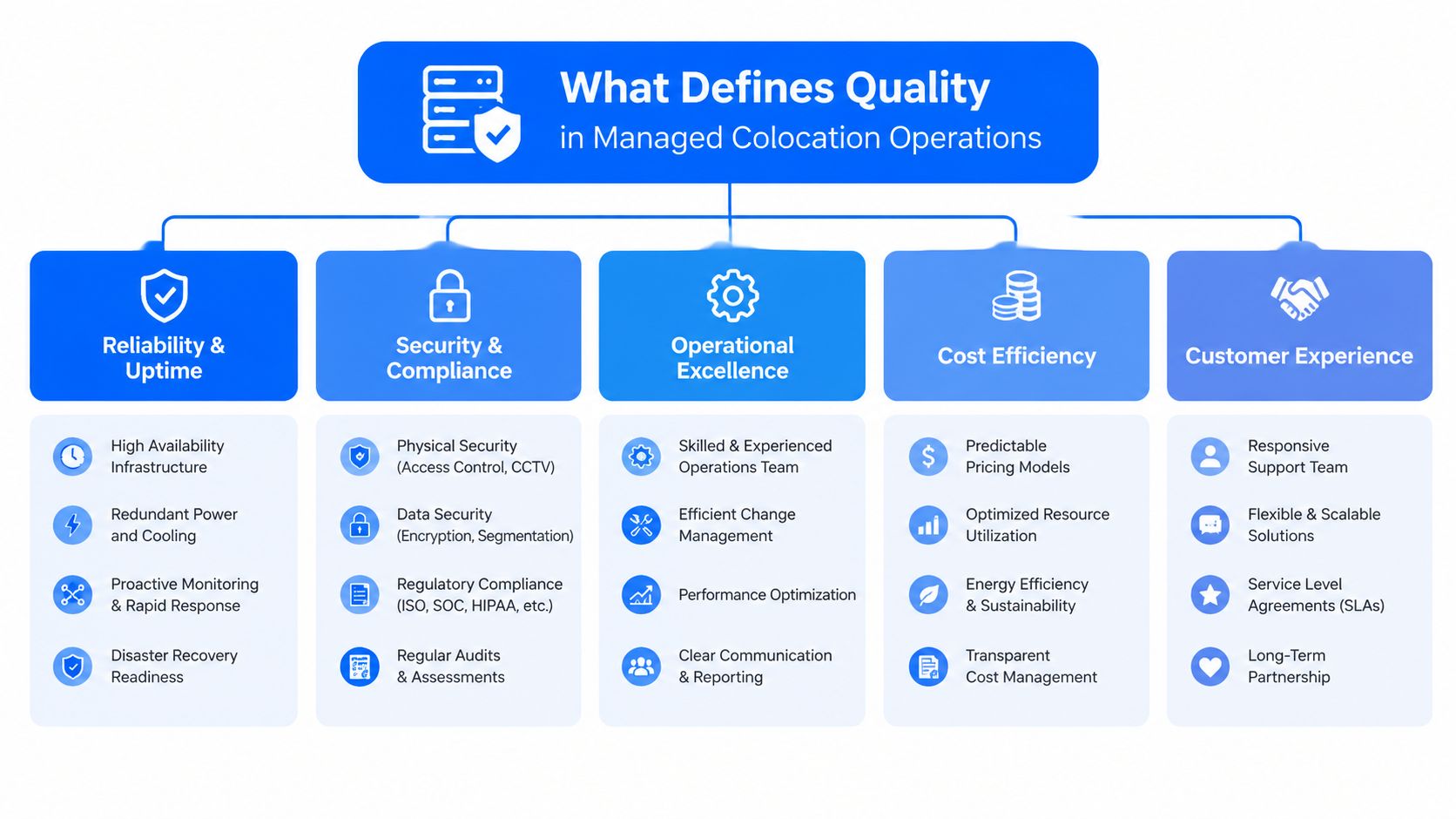
A managed colocation site can look polished and still miss the mark if it cannot support how your workloads run. Quality is not measured by square footage alone. It comes down to whether the provider can keep your rack density, power profile, and recovery targets intact without turning routine changes into custom work.
Density changes the operating model
Uptime Institute's 2024 survey found the average typical rack density was 8 kW, and its 2025 survey reported strong adoption of 10 to 30 kW racks (Uptime Institute). That matters because density changes power distribution, cooling layout, and cable management. If a provider cannot support that range, you may have to spread one workload across more racks, which raises footprint and interconnect complexity.
For CIOs, that makes managed colocation a density decision as much as a services decision. AI clusters, GPU-heavy analytics, and concentrated virtualization stacks all raise the same question, can the facility absorb the heat and power profile without improvisation? In the same Uptime Institute surveys, power remained the dominant reliability risk, accounting for 54% of impactful outages in 2024 and 45% in 2025, with UPS-related events called out as the most common source.
Uptime is a process, not a promise
A 2022 Spj Science paper on colocation leasing notes tenants typically require at least 99.999% uptime, and that managed services are governed by formal SLAs defining services, metrics, tracking, and penalties (Spj Science). That is the right frame for reliability. Uptime depends on facility design and operating discipline together.
A provider that can support high-quality managed colocation should be able to explain its dual utility feeds, UPS and generator chains, diverse network paths, and monitored backup and restore workflows. It should also show how it handles concurrent maintainability, so routine work does not become downtime risk.
Ask the provider how it absorbs failure without human delay. If the answer is vague, the service is not ready for your workload.
What to verify before you sign
- Power-path redundancy: Confirm how utility feeds, UPS units, and generators are arranged for your specific space.
- Cooling headroom: Ask how the site supports current and future rack density without hot spots.
- Remote remediation: Verify response times for failures that do not require an on-site visit.
- SLA structure: Check which actions are measured, what penalties apply, and what exclusions are written into the contract.
- Operational visibility: Request examples of monitoring, alerting, and reporting that your team will receive.
managed colocation operations guidance can help in procurement conversations, because the cost picture only makes sense when it is tied to service scope and operational depth.
Real World Applications for Hybrid and AI Workloads
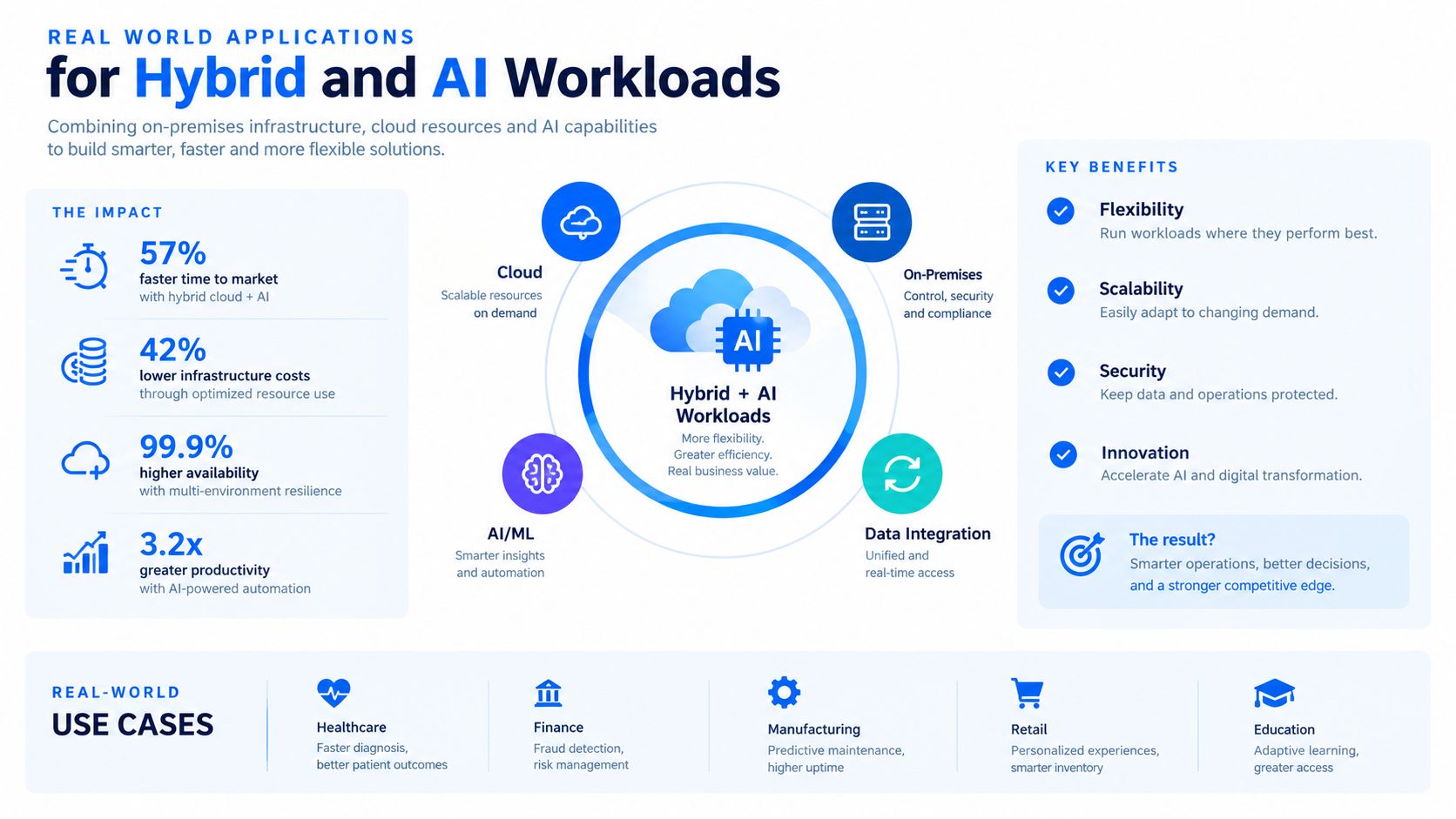
A managed colocation decision often starts with a practical question. Which systems should stay under your team's control, and which operational tasks should move to the provider? For hybrid cloud, AI, and regulated workloads, that split matters more than the address of the building.
Hybrid cloud and cloud repatriation
Hybrid IT is the clearest fit. Teams often keep owned systems in colocation while placing burst capacity, analytics, or SaaS-connected services in public cloud. For teams balancing distributed workspaces with AI infrastructure, hybrid work and AI insights can help frame the operating side of that choice.
That model also supports cloud repatriation. Some applications return from cloud because egress fees, lock-in, compliance paperwork, or compute costs no longer make sense. Colocation lets an enterprise regain hardware control without rebuilding the full internal operations stack, which is closer to taking back the engine room than buying new office space.
A separate planning lens is interconnection. Analysts at MarketsandMarkets US colocation data center market report that direct cloud links are a major selection factor for colocation buyers, which explains why the network path now sits beside power and cooling in the decision tree.
AI, edge, and sustainability choices
AI and machine learning add a different set of requirements. These workloads tend to need dense racks, steady network paths, and cooling choices that can handle heat without forcing a redesign of the room. For that reason, the provider checklist should focus on operational fit, not facility polish.
For AI workloads, prioritize providers that publish liquid-cooling rack limits and renewable-power percentages, and ask how they handle higher density over time. Those details say more about readiness than lobby design or marketing copy.
Sustainability also matters more as compute density rises. Recent market coverage points to liquid cooling and renewable power as important shifts in greener data center design. That makes the operational boundary clear. Keep the systems you need to own, hand over the facility work that can be standardized, and verify that the interconnection and density profile match the workload.
If you are comparing operating models across several sites, multi-cloud strategy guidance can help you think through where placement, resiliency, and interconnection should line up.
That is why managed colocation has become a compliance control as much as a cost control. It gives teams a place to run owned systems under a managed contract while keeping the audit trail and physical control many industries require.
How to Evaluate and Procure the Right Provider
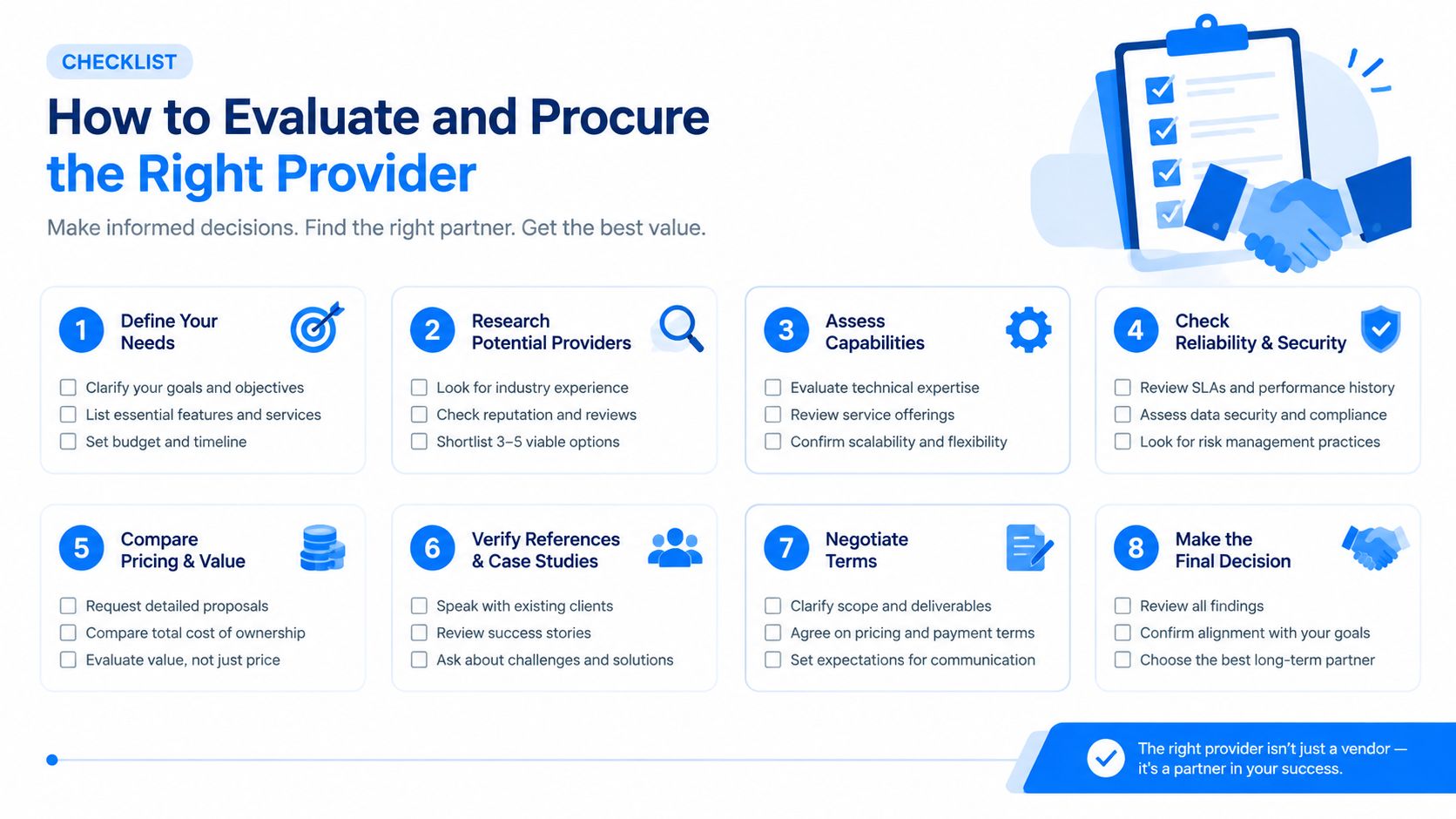
A managed colocation purchase starts like an operations review, not a property tour. A provider may promise reliability, security, and flexibility, but procurement should test how those promises hold up under your workload, your support needs, and your cloud-repatriation goals. The question is simple: which tasks stay with your team, and which ones can a specialist run better?
Start with scope, then test the operating model
Define the boundary first. If you are unsure whether you need remote monitoring, patching, backup administration, or full incident support, every quote will look different for the wrong reasons. A clear scope turns the provider review into a comparison of operating models, much like comparing two maintenance plans for the same engine.
Ask each vendor for a service map that shows who owns each task. Your team may keep architecture, security policy, and application ownership, while the provider handles monitoring, maintenance, remote hands, and escalation. That split matters because managed colocation is about control of operations, not a trade of ownership for rack space.
Then test how the model performs in practice. Look for SLA definitions, escalation paths, maintenance windows, penalty language, and reporting frequency. Ask how security controls are documented, how remote hands are handled, and what happens during a power-chain event or connectivity issue after hours.
Ask for the details that reveal operational maturity
- SLA proof: Request service definitions, not just uptime claims.
- Security practices: Verify access control, monitoring, and zero-trust alignment.
- Interconnection options: Confirm cloud on-ramps, carrier diversity, and cross-connect availability.
- Power and cooling headroom: Ask what the site supports today and what it can support without redesign.
- Sustainability commitments: Review cooling strategy and energy sourcing where relevant.
- Commercial terms: Check how expansion, support tiers, and incident response are billed.
A vendor-neutral process makes these comparisons cleaner. If you want a reference for managed IT services cost, use it to frame the economics around support scope, operating responsibility, and change over time, not just the initial quote. MR2 Solutions is one option for discovery and governance support, and its TBaaS framework is designed to align technology choices with business outcomes while reducing the noise of one-off sales conversations.
The most useful test is a shared workload scenario. One scenario might be a dense application stack with cloud interconnection. Another might be a regulated backup environment. A third might be a remote office cutover. The provider that looks cheapest on paper may become expensive once patching, support scope, or headroom limits are included.
If the quote does not clearly show who owns each operational task, the comparison is not ready.
Making Managed Colocation Work for Your Business
Managed colocation works when you treat it as an operating model decision, not a facility lease. The historical shift from pure colocation into managed services shows why the category matured, enterprises wanted more resilience, better connectivity, and less in-house complexity, without giving up ownership of the hardware itself (Data Center Knowledge).
The most useful question is simple. What must stay under your control, and what can be operated more effectively by a specialist provider? For some teams, that means keeping architecture, security policy, and application ownership in-house while outsourcing monitoring, maintenance, and incident response. For others, it means using managed colocation as a cloud-repatriation path that restores cost predictability and physical control.
The second question is whether the provider can support your actual workload shape. High-density racks, strong power-path redundancy, disciplined SLA handling, and direct cloud interconnection matter more than a nice facility tour. If the provider can't show those capabilities clearly, the service may look flexible on paper but feel restrictive once production workloads arrive.
The last question is internal readiness. Procurement, infrastructure, security, finance, and app owners need the same model of responsibility before you sign. That's where a structured advisory process helps, especially if you're comparing several vendors with different service tiers and contract language.
Start with one workload, one operating boundary, and one measurable service outcome. That's usually enough to tell whether the model fits.
If you're weighing colocation, managed operations, and cloud repatriation in the same planning cycle, MR2 Solutions can help you evaluate providers, define the service boundary, and govern the rollout with its vendor-neutral TBaaS approach. Visit MR2 Solutions to start a practical discussion about what to keep in-house and what to hand over.