
What Is Unified Communications and Why It Matters

Unified communications is the integration of voice, video, messaging, presence, conferencing, and collaboration into a coordinated user experience. The more important question isn't which UC platform to buy, but which communication risks, redundancies, and obligations your organization already owns.
The situation is familiar. One team manages a legacy phone system, another schedules meetings in a separate application, employees chat somewhere else, and the contact center follows its own rules. The tools may each work well in isolation, but the handoffs fail. A caller can't find the right person, a meeting recording has no clear retention policy, and an IT team spends more time maintaining integrations than improving service.
For a CIO, UC isn't a feature checklist. It's an operating model that connects people, devices, applications, and workflows. The platform matters, but the architecture, governance, network, identity model, and licensing portfolio matter more.
A Working Definition and the Question CIOs Should Ask First
Unified communications, or UC, combines multiple enterprise communication modes into one coordinated experience. Common capabilities include instant messaging, presence information, IP telephony, mobility, audio, video and web conferencing, desktop and data sharing, call control, voicemail, and unified messaging. The idea began taking shape in the mid-1990s as messaging and real-time communications started to converge, with an early milestone in 1993, when ThinkRite developed POET, a unified-messaging system for IBM's internal use. These historical details are documented in the overview of unified communications.
That definition is useful, but it's incomplete if it leads you toward a shopping list. UC routes communication to a person rather than a fixed location, supports desktop and mobile endpoints, and connects telephony with collaboration applications. Presence tells you whether someone is available, messaging handles a quick exchange, and voice or video provides a richer conversation without forcing users to abandon the workflow.
The sharper CIO question is: which communication risks, redundancies, and obligations do we already own?
A new UC suite can reduce tool sprawl, but it can also add another overlapping license, another identity store, another recording repository, and another administration console. Consolidation isn't automatically simplification. It succeeds only when the organization decides which capabilities should become strategic, which should remain specialist services, and which should be retired.

Treat UC as coordination, not replacement
The Unified Communications Interoperability Forum, announced in May 2010, focused on interoperability profiles, implementation guidance, and best practices across UC products and business applications. That emphasis remains important because most enterprises won't replace every endpoint, workflow, and specialist system at once. UC architecture must accommodate coexistence.
Start with an inventory of communication paths:
- People: Who communicates internally, externally, with customers, and with regulated populations?
- Devices: Which desktop, mobile, room, branch, contact-center, and legacy endpoints must remain available?
- Applications: Which CRM, directory, service desk, recording, workflow, and collaboration systems need integration?
- Obligations: Which communications must be retained, restricted, discovered, audited, or deleted?
A platform decision should follow that inventory. If it comes first, the organization will optimize for advertised features instead of business control.
The Core Components That Make Up a UC Platform
UC is a portfolio architecture, not a feature checklist. The postal-service analogy remains useful: presence is the address board, showing who is available and how they prefer to be reached. Voice and video are the conversations, messaging is the internal note, conferencing is the meeting room, and collaboration is the shared workspace where decisions and work products remain visible.
The architecture earns its value through channel transitions. Voice without presence forces callers to guess whether someone can answer. Messaging without escalation leaves urgent issues trapped in text. Meetings without collaboration separate recordings and action items from the work they support. Evaluate the handoffs between capabilities, not just the number of channels a vendor provides.
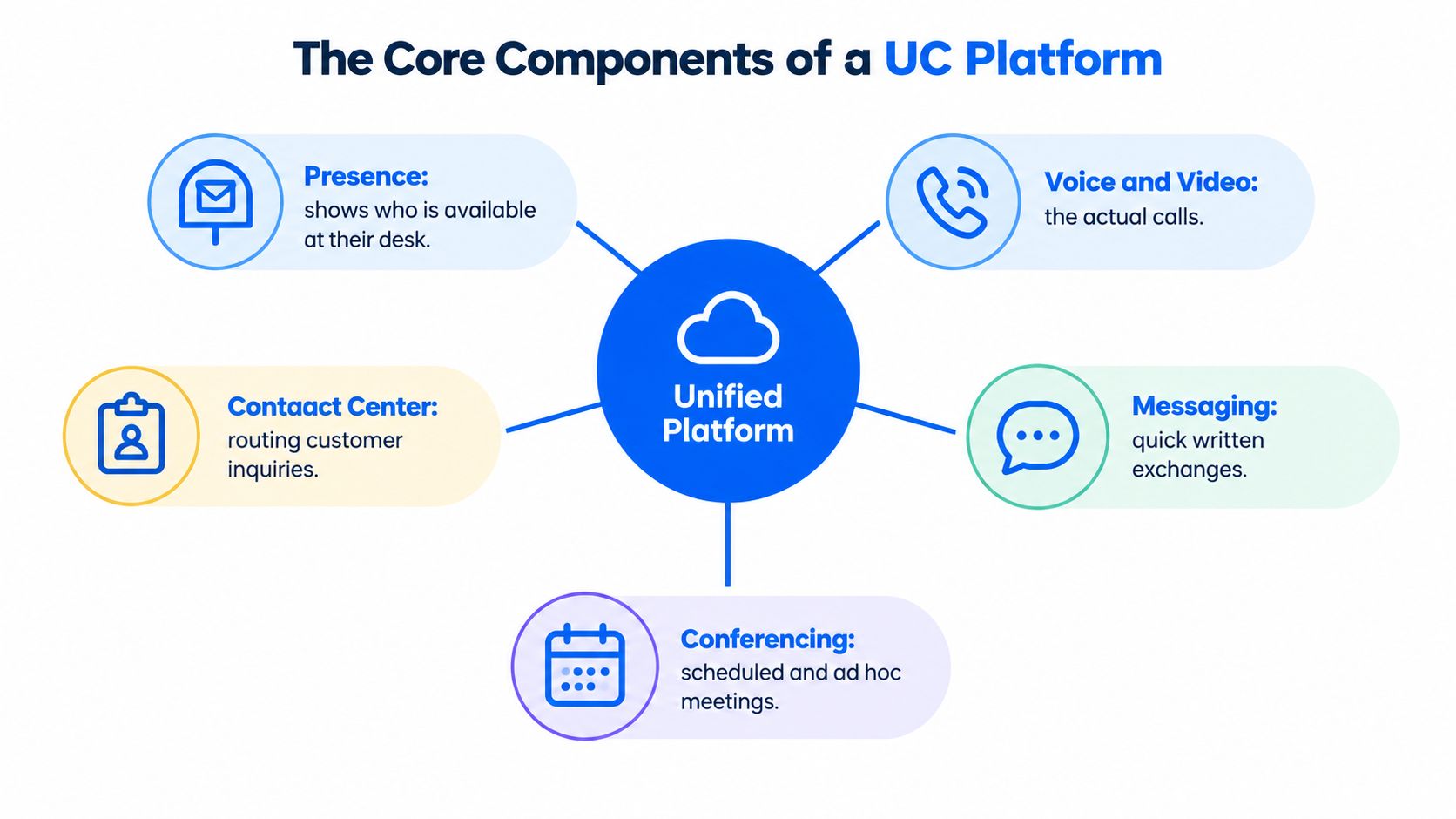
Five layers to test
Presence should report availability, status, location or device context where appropriate, and the channels a person can accept. Stale presence creates failed calls and false confidence, so test how status updates, overrides, and exceptions work.
Voice covers business calling, extension logic, voicemail, call control, mobility, emergency calling, and public telephone network connections. A modern interface does not prove that numbering, failover, or survivability meets operational requirements.
Video includes person-to-person calls, scheduled meetings, room systems, screen sharing, and content exchange. Assess it as a media service with network, endpoint, and room-system dependencies rather than as a button beside the dial pad.
Messaging supports quick internal exchanges, group conversations, notifications, and sometimes external communication. Set its classification early. Messages may be informal collaboration, business records, or both, with different retention and access controls.
Conferencing and collaboration connect calendars, shared files, whiteboards, recordings, transcripts, and tasks. Contact-center integration can extend the architecture to customer inquiries, but it adds separate routing, recording, analytics, and compliance requirements.
Map the existing stack against these layers:
- Duplicated: Which tools provide the same calling, meeting, chat, or recording function?
- Missing: Where must users leave the primary workflow to complete a task?
- Disconnected: Which systems lack shared identity, presence, calendar, directory, or CRM context?
- Uncontrolled: Which channels lack an owner, retention rule, access policy, or audit trail?
Use a capability map before selecting a platform. The Voicedial.ai Teams bot overview shows how a communications workflow can operate inside an existing collaboration environment. For broader reference, compare this map with the unified communications technologies overview, then test each claimed capability against ownership, integration, and operational requirements.
How UC Works Under the Hood
A UC platform separates signaling from media. Signaling establishes a session, identifies participants, negotiates capabilities, and ends the session. Media carries voice, video, or other real-time content after the session exists. Treat these as separate technical and security boundaries.
SIP handles session signaling, including establishing, modifying, and terminating sessions. RTP carries the actual voice and video media between endpoints. A successful signaling exchange can therefore coexist with a blocked, misrouted, or poorly secured media path. Securing SIP does not secure RTP or other associated protocols.
Session Initiation Protocol became a major technical milestone when it was standardized in 1999. It supports voice, video, instant messaging, web integration, and other multimedia interactions. RFC 3261 documents the protocol and makes the security separation clear: protecting SIP signaling does not determine the security of RTP.
The questions behind a vendor demonstration
Require vendors to show the separate paths, not only the polished interface:
- Signaling: How do endpoints authenticate, register, and negotiate sessions?
- Media: How does RTP or protected SRTP audio and video move between endpoints?
- Identity and presence: Which directory controls identity, status, devices, and permissions?
- Gateways: How do legacy PBX systems, contact centers, recording platforms, and external networks connect?
- Failure handling: What happens when a WAN path, identity service, gateway, or cloud connection becomes unavailable?
These answers expose the actual architecture behind the feature list. They also show where ownership sits when a call crosses local infrastructure, provider services, identity systems, and external networks.
On-premises, cloud, and hybrid models implement these layers differently. On-premises deployments give the organization direct control over signaling, media, gateways, and upgrades, while requiring internal infrastructure and specialist skills. Cloud UCaaS can shorten deployment and shift platform operations to a provider, but it increases the importance of provider dependencies, data location, service boundaries, and exit planning. Hybrid designs retain selected local services while connecting cloud collaboration. They can suit complex estates, but every additional interface adds monitoring and failure-handling work.
The operational rule is simple: a successful SIP registration does not prove that the media path works. Test call setup, one-way and two-way audio, video, recording, failover, and endpoint behavior across real sites and access networks. Use those results to judge the platform as an operating model, not merely as a collection of communication features.
On-Premises, Cloud, and Hybrid Deployment Compared
The common assumption is that adding a UC suite automatically reduces complexity. It doesn't. A suite may consolidate the user interface while leaving separate telephony, contact-center, mobile, recording, compliance, and regional numbering services underneath. It may also overlap with collaboration licenses the organization already owns.
The right comparison uses three questions: How much control is required? How quickly must the service change? How much integration complexity can the IT team operate?
| Dimension | On-Premises | Cloud (UCaaS) | Hybrid |
|---|---|---|---|
| Control | Highest control over infrastructure, upgrades, and local data handling | Provider manages much of the service lifecycle | Control is divided across local and provider-managed components |
| Cost profile | Infrastructure and specialist operations remain internal | Subscription model improves planning but requires license discipline | Multiple operating models can create duplicated costs |
| Time to value | Usually slower, especially with legacy integration | Usually faster for standard workloads | Depends on the complexity of coexistence |
| Integration | Flexible, but the organization owns the engineering | Provider APIs and supported integrations shape options | Broad flexibility, with more interfaces to govern |
| Survivability | Local resilience can support branch or site continuity | Requires careful WAN, provider, and emergency-calling design | Local services can protect selected critical workloads |
| Exit risk | Hardware and expertise can create lock-in | Data portability, numbering, contracts, and workflow migration matter | Exit planning must cover both local and cloud dependencies |
Where each model fits
On-premises remains defensible when the organization needs direct infrastructure control, specialized legacy integration, or local operating behavior that cloud services can't provide. It ages fastest when hardware, software versions, skills, and vendor support become constraints.
Cloud UCaaS fits organizations that value provider-managed updates, distributed access, and a faster route to standard calling, messaging, and meetings. It isn't a free pass on sovereignty, emergency calling, recording, identity, or contract risk. Cloud delivery changes who operates the service, not who remains accountable for outcomes.
Hybrid is often the practical default for regulated, multi-site, or operationally complex organizations. Keep local survivability, specialized recording, or sensitive workflows where they belong, while using cloud collaboration for users who benefit from it. The trade-off is a larger management surface.
Decision rule: Choose the deployment model by workload, not by corporate fashion.
| Workload type | Model that typically fits | Decision priority |
|---|---|---|
| Global contact center | Cloud or hybrid | Routing, analytics, integrations, recording, and regional service coverage |
| Internal collaboration | Cloud or existing collaboration suite | Adoption, identity, usability, and license overlap |
| Regulated recording | Hybrid or controlled cloud | Retention, discovery, access, residency, and auditability |
| Branch survivability | On-premises or hybrid | Local calling, WAN failure behavior, emergency access, and support |
A broader hybrid cloud management approach can help teams assign ownership across these boundaries. The same portfolio discipline applies to adjacent enterprise systems. For example, an HR cloud software buyer guide is useful when comparing cloud convenience with data governance and integration responsibility.
Integration and Security Considerations CIOs Cannot Ignore
UC security has two parallel tracks. The first protects signaling, including authentication, session control, certificates, and administrative access. The second protects media, including voice and video carried through RTP or SRTP. Securing one doesn't automatically secure the other.
Identity should be the control plane. Integrate UC with the organization's directory and single sign-on where possible, enforce strong authentication for administrators, apply role-based access, and remove access promptly when employment or responsibilities change. Presence also needs governance because availability data can reveal working patterns, locations, and personal circumstances.
Network quality deserves equal attention. ITU-T Y.1545 identifies IP transfer delay, delay variation, or jitter, and packet-loss ratio as core quality-of-service measures. A UC operations team should monitor one-way latency, jitter, loss, MOS or an equivalent voice score, call setup failures, dropped sessions, and media-path asymmetry by site and access network.
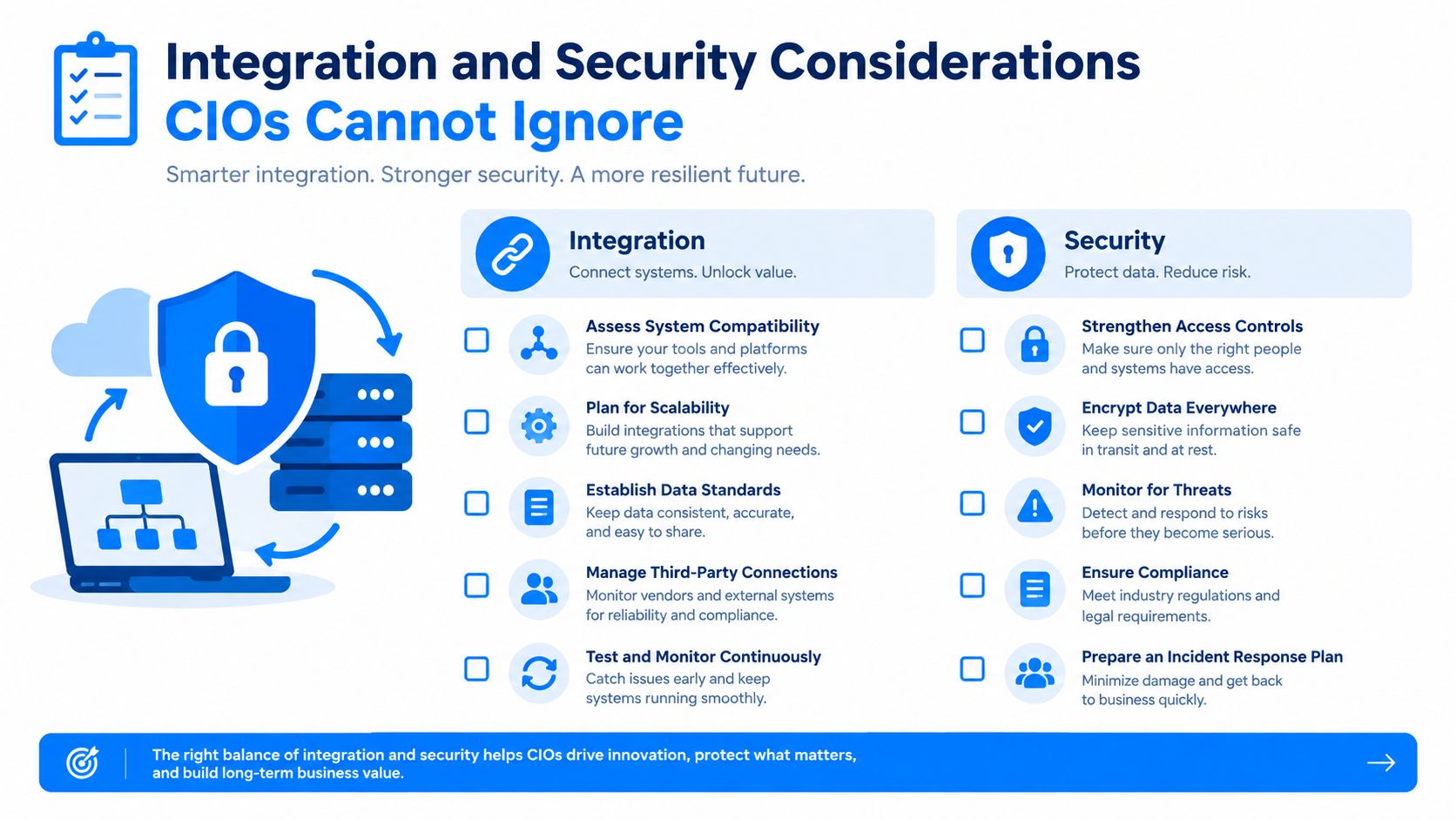
A successful registration doesn't prove a reliable media path.
What good looks like before approval
- Identity: One authoritative identity source, clear administrator roles, enforced joiner-mover-leaver controls, and auditable access.
- Quality: Endpoint and WAN measurements, traffic classification, resilient paths, and synthetic calls that test real media.
- Signaling: Authentication, encryption, certificate management, and protections against unauthorized session control.
- Media: Separate encryption decisions for voice and video, documented key handling, endpoint hardening, and controlled recording paths.
- Integration: Explicit ownership for CRM, directory, calendar, contact-center, gateway, and emergency-calling dependencies.
- Resilience: Tested behavior during provider, WAN, identity, gateway, and power failures.
Teams that need a practical starting point can use this guide on securing voice and SMS as a complementary security reference. The CIO's reporting should connect each technical control to an outcome: fewer failed sessions, controlled administrative access, reliable emergency calling, demonstrable retention, and faster incident investigation.
Governance, Compliance, and the Hidden Cost of Consolidation
Consolidation reduces the number of places where employees work, but it can increase the concentration of compliance exposure. A chat message, voicemail, meeting recording, transcript, or AI-generated summary may each carry different retention, discovery, privacy, and access requirements.
Consider a healthcare organization. A patient-related conversation in chat, a recorded consultation, and an internal operational meeting may involve different sensitive information and different access groups. A financial-services organization may need to govern recorded voice, client communications, research discussions, and supervisory review through rules that don't map neatly to a single platform setting.
The platform can store these channels together without making their obligations identical. Governance must follow the content and the use case.
Use a channel-by-channel control sheet
| Channel | Retention question | Access question | Audit and production question |
|---|---|---|---|
| Chat | Which conversations qualify as business records? | Can managers, legal teams, or investigators access them? | Can the organization search and export them in a defensible way? |
| Voicemail | Is the message operational, customer-related, or regulated? | Who can retrieve, forward, or delete it? | Are access and deletion events recorded? |
| Recording | Which calls require recording or notification? | Who may listen, download, or annotate? | Can the organization produce the relevant segment and metadata? |
| Transcript | Does the transcript create a separate record? | Are sensitive names, disclosures, or terms restricted? | Can edits, versions, and source recordings be traced? |
| AI summary | Is the summary advisory or an official record? | Can the system expose confidential or personal information? | Can the organization explain how the summary was generated and retained? |
A compliance-focused UC and collaboration compliance paper emphasizes that policies must cover customer data across messaging and voice communications. The same principle applies to internal records. Define what must be retained, who can access it, where it is stored, and how it can be produced for an audit or legal request.
Productivity versus surveillance
Transcription, sentiment analysis, and automated summaries can improve accessibility and make conversations searchable. They can also expose personal information, customer data, or employee behavior beyond what users expect. Adoption will suffer if workers believe every informal exchange becomes a permanent performance record.
Publish clear notices, limit access, set purpose boundaries, and separate useful assistance from unnecessary monitoring. A unified platform should unify policy decisions, not erase them.
Adoption Patterns, ROI, and Choosing the Right Path
Most organizations fall into one of three adoption profiles.
Greenfield cloud-first organizations have limited legacy telephony and can standardize identity, calling, meetings, messaging, and collaboration early. Their return tends to appear through faster operational rollout and simpler administration, provided they control licensing and governance from the start.
Hybrid optimizers keep specialist or site-critical services while moving selected users and workflows into cloud collaboration. Their return is usually measured through better interoperability and targeted modernization, not total platform replacement.
Consolidators already pay for a collaboration suite and are deciding whether to move telephony into it. Gartner's 2025 strategic assumptions project that 90% of organizations will use existing cloud office or collaboration platforms for enterprise telephony by 2028, up from 30% in 2025, while spending on traditional telephony platforms could fall by 50%. These are projections, not guarantees, and the source is Gartner's cited 2025 forecast document.
The same document reports that UCaaS is already the primary platform for calling, meetings, and messaging for almost 59% of organizations in a global 2025 study of 797 organizations. That makes rightsizing more urgent than adding another suite.
Measure behavior, not procurement
Compare active daily users with licensed seats. A large gap indicates that deployment, workflow fit, training, or policy may be failing. Also examine call quality, support volume, abandoned workflows, recording retrieval, and redundant licenses.
A CIO choosing between an existing collaboration platform and a specialist UCaaS provider should test PSTN and emergency-calling requirements, survivability, integrations, analytics, international numbering, accessibility, adoption, total cost of ownership, and exit risk. Phase the move by user group or workload, keep voice failover intact, and retire duplicate services only after the replacement proves reliable.
For a structured view of platform capabilities, compare your requirements with unified communications software options before seeking proposals.
The Three Questions to Take to Your Next Planning Meeting
Ask your team:
- Which communication risks and redundancies do we already own?
- Where is compliance exposure concentrated, by channel, data type, access group, and storage location?
- How will we measure real adoption against licensed seats and service quality?
UC is moving toward tighter coupling with collaboration suites and more AI-assisted summarization. Make today's decision portable: document identities, integrations, retention rules, media paths, numbering, and exit requirements instead of assuming one platform will own every future workflow.
MR2 Solutions helps organizations evaluate, procure, implement, and govern unified communications across voice, video, messaging, mobility, contact-center integration, and collaboration. Visit MR2 Solutions to discuss a vendor-neutral assessment of your UC portfolio, deployment model, licensing overlap, security controls, and adoption plan.