
Enterprise Network Design: How to Plan It Step by Step

You are three weeks from a board meeting, the WAN contract is up for renewal, and the only diagram anyone can find is a Visio file from the last firewall refresh. Application owners say the network is "slow." Security wants more segments. Finance wants fewer circuits. Nobody has written down which systems fail if a single carrier entrance goes dark, or who stays on call when a policy change breaks checkout at 9 a.m.
That gap is the core design problem. Bandwidth and uptime targets matter, but so does whether the team you have can run the network you are about to buy. The most segmented fabric, or the one with the most boxes, is not automatically the better one.
The Seven Phases of an Enterprise Network Design
The expensive mistake is buying an SD-WAN platform or a firewall refresh before anyone has mapped which applications depend on which links. The design then bends around the product. Licenses get spent on features nobody operates, and the first outage exposes a dependency that never made it onto a diagram.
Treat enterprise network design as a gated sequence. Phases overlap in a real project, but the order governs decisions. No product is selected until phase 3 is signed off.
- Inventory. List users, devices, applications, data flows, and dependencies. Output: a flow map.
- Classify. Rank workloads by business criticality and regulatory exposure. Output: a workload register.
- Requirements. Set availability, latency, recovery, and access targets. Output: a requirements sheet, signed by application owners and finance.
- Topology. Pick a layout per site type. Output: topology diagrams, signed by network engineering.
- Failure domains. Engineer redundancy and list every single point of failure. Output: a failure-domain map, signed by operations and facilities.
- Policy. Set WAN, cloud, and segmentation controls. Output: a policy model, signed by security.
- Validation. Test capacity and failover, then add telemetry and change control. Output: a test report and runbooks, signed by operations before go-live.
Assign those owners before the workshops start. A requirements sheet that application owners never saw will be rewritten during the first incident. A policy model that security did not sign will be bypassed the first time a project is late.
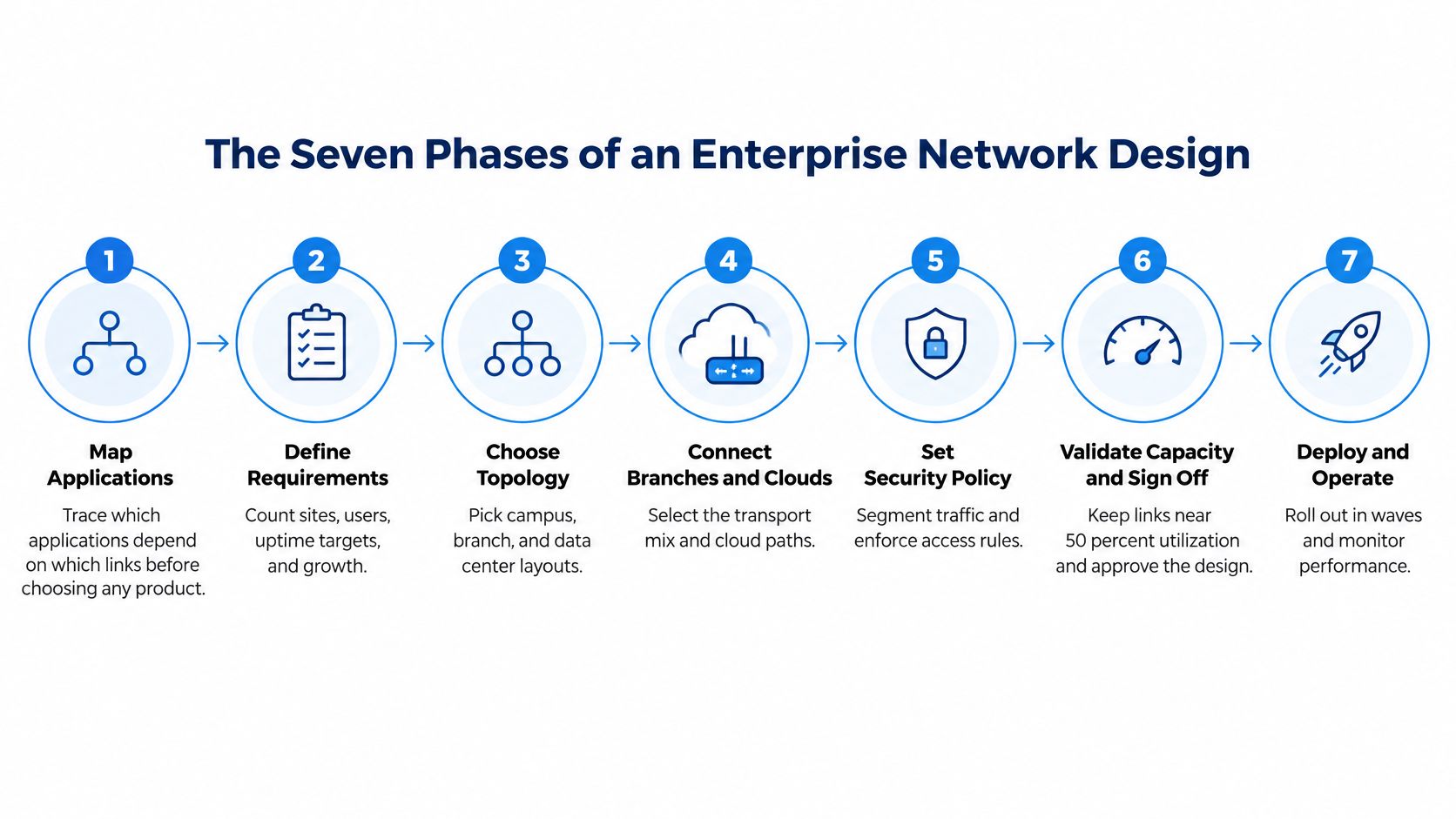
I would not let a vendor demo move phase 4 ahead of phase 3. If the requirements sheet is still blank, you are shopping, not designing.
Gather Requirements and Classify Your Workloads
A network can meet its bandwidth and uptime targets and still fail its users if the operating team cannot manage its policies or diagnose its dependencies. Start by setting requirements for each workload class, then check that the team can support the design those requirements imply. The most segmented or redundant option is not automatically the best fit.
NIST SP 800-207 assumes the enterprise network may already be compromised. Access should be judged per request using identity, device posture, and policy, rather than granted because a device is “on the LAN.” NIST planning guidance offers example zero-trust implementation patterns to compare. Use them as references, not as a shopping list or a template to copy without considering your environment.
Set a target for every workload class before discussing topology. These are planning values, not guarantees. Confirm each one with the owner who would feel the impact of an outage.
| Workload class | Typical examples | Latency budget | Recovery target (RTO / RPO) |
|---|---|---|---|
| Mission-critical | Core ERP, payments, EHR, dispatch | under 50 ms to primary users | RTO minutes / RPO near zero |
| Business-critical | Email, CRM, collaboration, VoIP | under 100 ms | RTO 4 hours / RPO 1 hour |
| Standard internal | File shares, intranet, internal wiki | under 200 ms | RTO 24 hours / RPO 24 hours |
| Guest and IoT | Guest Wi-Fi, sensors, building systems | best effort | RTO 72 hours / RPO 24 hours |
How to fill the cells
Interview each application owner for an hour. Then capture traffic for two to three weeks on the links those applications use. NetFlow or equivalent data from the core and firewall can reveal connections missing from runbooks. For example, a payment service may still call a fixed address on a partner network. Record the partner, protocol, and expected behavior when that connection fails.
Group the register by owner as well as by workload class. A sales-owned CRM and a clinical system may share a latency band, but their maintenance windows and outage consequences differ. The owner's ability to explain dependencies and recovery behavior is part of the design input, not an administrative detail.
Practical rule: If the application owner cannot say what the system must do when its primary link fails, the requirement is incomplete. Hold off on choosing a topology for that workload.
Trust boundaries before segments
Mark remote users, branches, and third parties on the same flow map. Document application-to-application traffic before planning microsegmentation. Missing dependencies can cause legitimate traffic to be blocked and leave operations teams tracing failures across systems they did not know were connected. A segmentation plan that the team cannot maintain is not a safer design in practice.
Choose a Topology for Campus, Branch and Data Center
Decide with four facts in hand: how many sites you have, how much traffic is east-west, how often the network changes, and which skills the on-call team has. A spine-leaf fabric is the wrong gift for a three-person team that changes the network twice a year.
| Topology | Best fit | Strength | Where it strains |
|---|---|---|---|
| Collapsed core | Single building, small site | Low cost, few devices to manage | Growth beyond a few hundred users or many access switches |
| Three-tier campus | Multi-building campus | Clear separation of access, distribution and core | Higher cost and cabling; slower change at scale |
| Spine-leaf | Data center, east-west heavy workloads | Predictable latency, linear scaling | Overbuilt for north-south-only environments |
| Hub-and-spoke with SD-WAN hubs | Branch networks | Uniform branch config, central policy | Hairpinning if hubs are far from SaaS and cloud |
| Full mesh WAN | Few high-value sites | Shortest paths, fast failover | Tunnel and circuit count grows quadratically |
Collapsed core is the honest choice for one building. A separate distribution layer costs more than it saves until you have many access closets. Three-tier campus earns its cabling bill when policy and access switching need a clean break across buildings. Spine-leaf is the data-center default once server-to-server traffic dominates and you care about predictable latency. It is wasted money if almost every flow is still north-south to a firewall.
Hub-and-spoke with SD-WAN hubs keeps branch configs identical, which is what a small operations team can realistically run. Full mesh only pays off for a handful of high-value sites. Tunnel and circuit count climbs fast, and so does the chance that a routing change touches every site at once.

Size the uplink for the next cycle
Don't size a core or data-center uplink to today's average. IEEE's Ethernet record shows bandwidth demand has historically grown by about a factor of 10 every five years, with 800 Gb/s described in 2024 as the newest major rate. Buy modular chassis and optics so a faster module lands later without a forklift swap of the switch.
Two edge cases deserve a second drawing. A branch that adds a second building is a campus, not a fatter spoke, and it needs distribution separation before the access layer turns into a hairball. A data center that hosts an AI cluster usually needs a second spine plane rather than a wider version of the first one. If you are placing that fabric, a data center design review should cover power, cooling, and the east-west path together, not as three separate tickets.
Remove Single Points of Failure Across the Stack
An uptime percentage on a slide is not a design. Uptime Institute's Tier framework turns availability into maintenance rules. The institute reports more than 4,300 Tier awards across over 120 countries. That shows wide use of the classification. It is not a measured probability of network uptime, and it does not guarantee application availability.
| Tier | What it guarantees | Network design it implies | Typical use |
|---|---|---|---|
| Tier I | Basic capacity; site-wide shutdowns possible | Single path, single carrier | Non-critical branches |
| Tier II | Redundant capacity components; shutdowns still needed | Spare devices on a single distribution path | Smaller offices with moderate needs |
| Tier III | Concurrently maintainable; no outage for planned work | Dual paths, dual carriers, separate power feeds | Mission-critical applications and core sites |
| Tier IV | Fault tolerant; single failure invisible to operations | Fully independent paths and control planes | Services where any outage is unacceptable |
Assign a tier, then hunt the shared dependency
Map each critical service to one tier, then list single points of failure across power, carrier circuits, edge devices, firewalls, core switches, routing control planes, and management systems. A payments platform that must stay up through planned work belongs at Tier III. A dispatch system where users must never see a single equipment failure belongs at Tier IV. A sales office that can take a weekend window can stay at Tier I or Tier II.
Buying two of everything while keeping one telecom entrance, one configuration system, one software image, or one upstream provider is the usual failure. The spare firewall does nothing if both units boot the same bad image, or if both circuits enter through the same riser.
Tests that decide whether the tier is real
Run failure and maintenance as separate exercises.
- Pull a live uplink during a planned business-hour window, with the application owner watching.
- Measure convergence in seconds, not as "it came back."
- Confirm capacity on the surviving path under peak load, not under lab traffic.
- Time the rollback of a bad change, including who is allowed to push it.
Two routers and one entrance is one failure domain with a higher invoice.
Operator procedure is part of the tier. If only one engineer knows the failover, you don't have concurrent maintainability. You have a hero dependency.
Connect Branches and Clouds Without Breaking Policy
Three decisions shape branch and cloud connectivity. Get them in this order, or policy will be rewritten in the first month of production.
Transport mix. Use MPLS, or an equivalent private path, for business-critical flows that need predictable delay. Use broadband where cost matters more than a strict latency budget. Use LTE or 5G as backup, or as the only practical circuit where wired delivery is slow. Don't put every class of traffic on the cheapest link and then wonder why voice fails.
Path selection. Send SaaS and cloud traffic straight to the internet or a cloud on-ramp. Backhauling it through a distant data center is where most branch latency complaints start. Application-aware selection belongs in the policy model, with a named owner for exceptions.
Hub placement. Put SD-WAN hubs and cloud on-ramps near the regions where the applications run. Measure round-trip time from each branch to each hub before you sign the design. A hub that looks central on a map can still add 40 ms of avoidable delay for the sites that matter.

Cloud pattern and address plan
Inside the cloud, a hub-and-spoke virtual network keeps shared services (firewall, DNS, private connectivity) in one place and spokes for each application team. Write down who owns the route tables and who approves a change. Overlapping address space between the data center, the branches, and the cloud accounts is the most common reason a planned integration stalls. Reserve ranges before the first subscription is created, and reject any new account that can't show a non-overlapping block.
Cisco's 2024 Global Networking Trends research, conducted with IDC among more than 2,052 IT leaders and professionals in 13 markets, found that 72% of respondents expected to adopt a network-platform architecture across at least one enterprise networking domain. That expectation is not a vendor decision. Test any platform on policy portability, telemetry you can export, and the cost of leaving. A managed SD-WAN service comparison should score those three items before feature lists.
Segment Access With Zero Trust Principles
Build enforcement in an order the operations team can survive. Start with identity and device posture for remote users and privileged access. Group workloads into a small number of segments by sensitivity and by owner, not by every application name. Enforce policy at the firewall, at the cloud boundary, and at the workload only where east-west traffic is heavy enough to justify it. Park unmanaged devices and legacy systems in their own zones, with compensating controls you can monitor in practice.
NIST Special Publication 800-207 (2020) treats network location as insufficient evidence of trust and calls for continuous decisions about users, devices, applications, and resources, including across cloud and remote access. In 2023, SP 800-207A extended that guidance to cloud-native and multi-cloud access control. A plain-language Splash Access guide to zero trust is a useful briefing for application owners who will not read the NIST publications and still have to approve access rules.
Telemetry is part of the segment
Turn on flow logs, authentication events, and policy hit counts on day one. A segment you can't see is a segment you can't debug. If a rule never hits, delete it. If it hits constantly, it is part of normal traffic and should not page anyone.
The most segmented design is not automatically the most secure. Every extra segment adds policy to write, review, and troubleshoot. I would keep a new segment only when you can show it shrinks incident scope. If it only adds tickets, fold it back.
Tie the same policy to branch and remote access so a user doesn't get a different trust decision on Wi-Fi than on the SD-WAN security path. Measure three outcomes quarterly: incidents contained inside one segment, time to authorize a legitimate access request, and hours spent changing policy. If the third number rises and the first two don't move, you have built complexity, not control.
Validate Capacity and Sign Off the Design
Keep core and WAN links near half of capacity during steady-state operation. If peak traffic pushes a surviving path to 70 percent after a failure, congestion can make applications appear down even after routing converges. Model failover load before testing it.
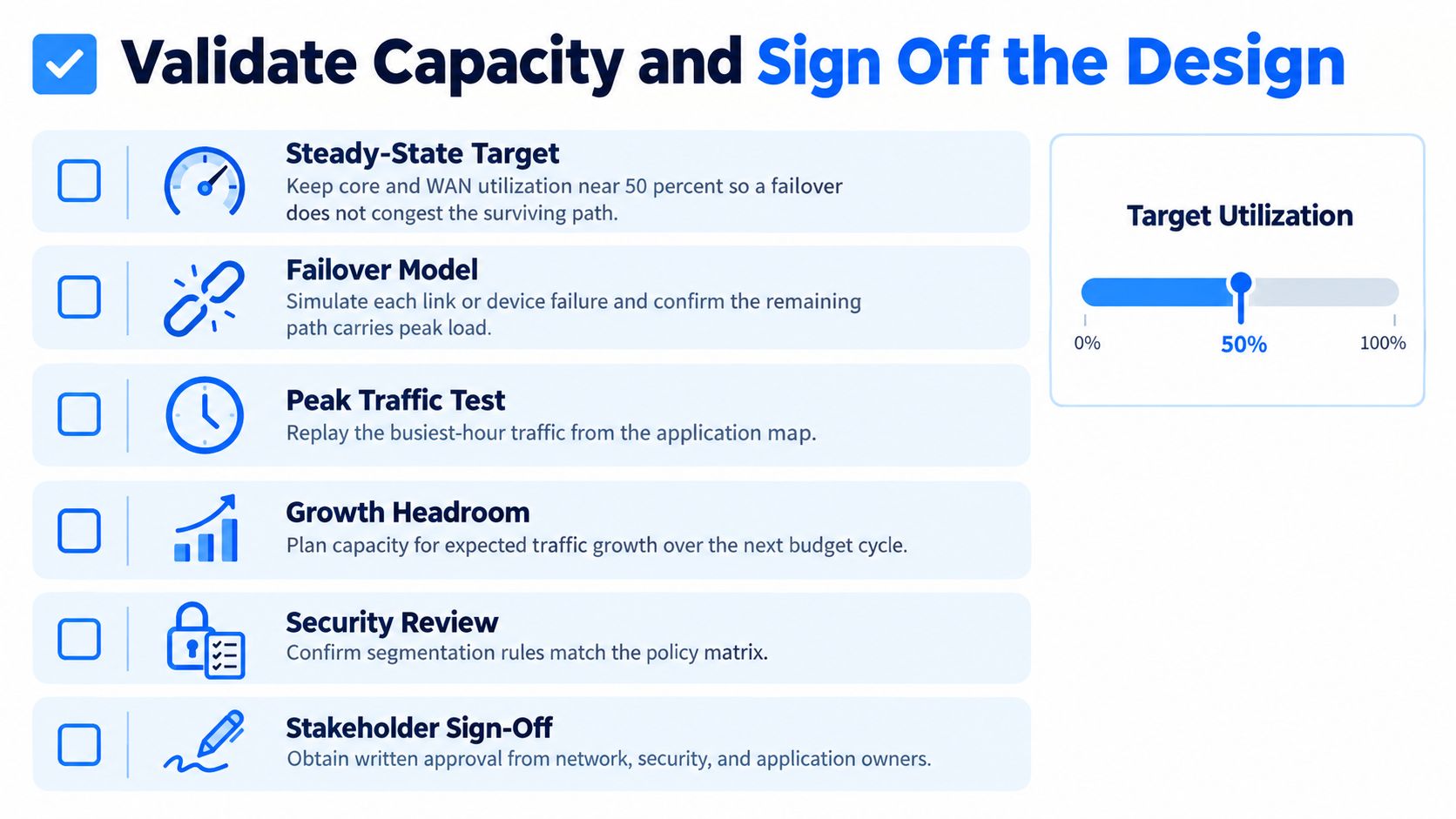
Test representative traffic, not a quiet Sunday. Record the metric and its result, not just a pass or fail.
| Scenario | Metrics to record |
|---|---|
| Link failure at peak | convergence time, lost sessions, congestion on surviving path |
| Firewall failover mid-session | session survival, failover time |
| Routing control-plane restart | adjacency recovery time, route flaps |
| Cloud region disruption | failover to alternate region, RTO achieved |
| Bad configuration rolled back | rollback time, change scope |
Operating capacity is a design input
A topology and bill of materials do not show whether your team can run the network. Document how many management consoles staff must use, what alert volume a shift can handle, who covers overnight escalation, which skills day-two work requires, and which functions stay in-house.
Staffing constraints belong in the design review. In the 2025 Cisco Cybersecurity Readiness Index, 86% of respondents viewed cybersecurity-talent shortages as a challenge, 39% called the shortage significant, and 31% identified the network as the most difficult security pillar to protect. A simpler network with clear ownership and fewer consoles may be easier to operate than a more elaborate design the team cannot support.
What sign-off actually means
Get application owners, security, and operations to sign the test report before approving the design. Document steady-state headroom, record measurements for each scenario above, confirm that rollback fits the maintenance window, and check that alert volume fits the roster. Name the managed and in-house functions.
If the roster cannot cover the design, pause the purchase and compare managed options against the same operating-capacity sheet. Vendor integration gaps can cause more trouble than a missing feature.
MR2 Solutions helps mid-market and enterprise teams assess, design, and optimize enterprise networks, including hybrid connectivity and SD-WAN, through a vendor-neutral brokerage. An outside review can help resolve gaps in a requirements sheet, failure-domain map, or operating-capacity model before a contract is signed. Visit MR2 Solutions to start that conversation.